
Open Site contents on any team site and you’ll find libraries you never created. SharePoint Online has three everyday library types (document library, Site Pages, Site Assets), three classic ones (picture, form, wiki page) and a few system libraries.
In this tutorial, I’ll walk through the types of libraries in SharePoint, show what each one holds on a real team site, and tell you which one to pick.
Quick answer: Use a document library for almost everything. Site Pages holds pages, Site Assets holds files the site needs, and picture, form and wiki page libraries are classic types you rarely need.
All SharePoint library types at a glance
Every library is built on the SharePoint document library, with its own template, default view and content type. Here’s what I found on my EnjoySharePoint team site:
| Library type | How you get it | What it holds | Use it today? |
|---|---|---|---|
| Document library | Comes with the site, or + New > Document library | Any file: Word, Excel, PDF, video | Yes, your default |
| Site Pages | Comes with the site | Modern pages and news posts | Yes, automatically |
| Site Assets | Comes with the site | Logos and files the site uses | Yes, automatically |
| Picture library | + New > App | Images | Rarely |
| Form library | + New > App | InfoPath XML forms | No, InfoPath is retired |
| Wiki page library | + New > App | Classic linked wiki pages | Rarely |
| Style Library, Form Templates, Preservation Hold | SharePoint creates them | System files | Leave alone |
Site contents shows each library’s template in the Type column (sorted Z to A here):
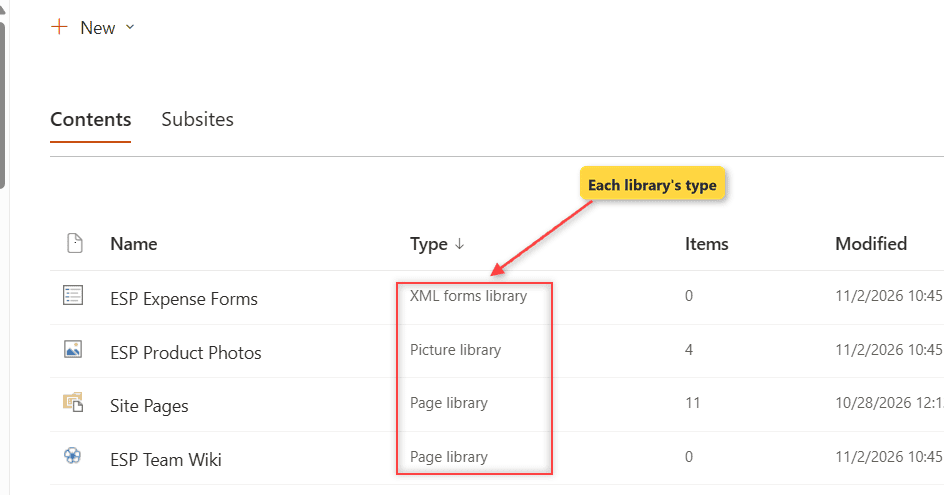
Site Pages and my wiki library both show as Page library, and the form library shows as XML forms library. Everything else is a plain Document library.
Document library: the one you’ll use most
Every new site gets a document library named Documents (URL /Shared Documents). It supports versioning (on by default, 500 major versions), check-out, metadata, co-authoring and sync. If you’re unsure between a list and a library, see my SharePoint list vs library comparison.
To add another one, select + New > Document library. The dialog gives you three starting points:
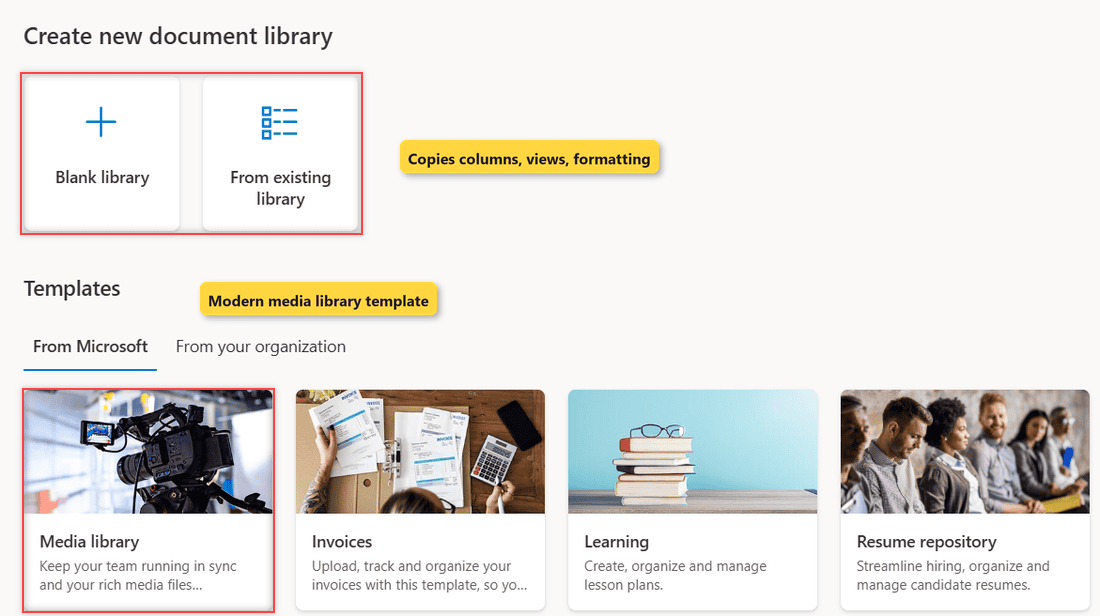
- Blank library: an empty library.
- From existing library: copies another library’s columns, views and formatting, not its files.
- Templates: Media library, Invoices, Learning and Resume repository on my site.
Site Pages library
Site Pages stores every modern page and news post, not your Word or Excel files; saved page templates in SharePoint sit in its Templates folder. It’s built on the wiki page library template, which is why it shows as a Page library.
Site Assets library
Site Assets holds files the site needs: the site icon, images you drop on pages, notebook files and spreadsheets you import to build a list. When you change the SharePoint site logo, the image lands here.
Don’t keep working documents there; nobody looks for them in Site Assets.
Where are the classic library types?
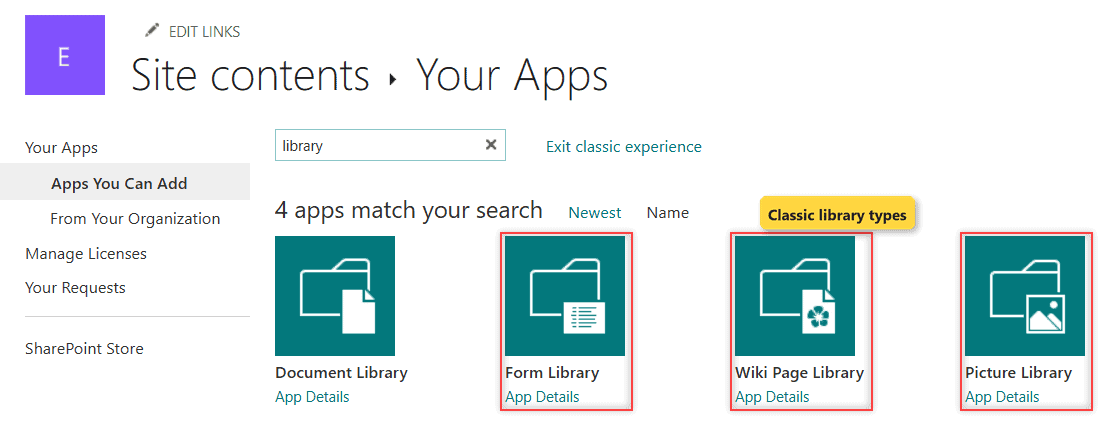
Select + New > App in Site contents to open the classic Your Apps page. Searching for library returned exactly four apps on my site:
What is a picture library in SharePoint?
A picture library is built for images and uses the Picture content type. I created ESP Product Photos and uploaded four product shots:
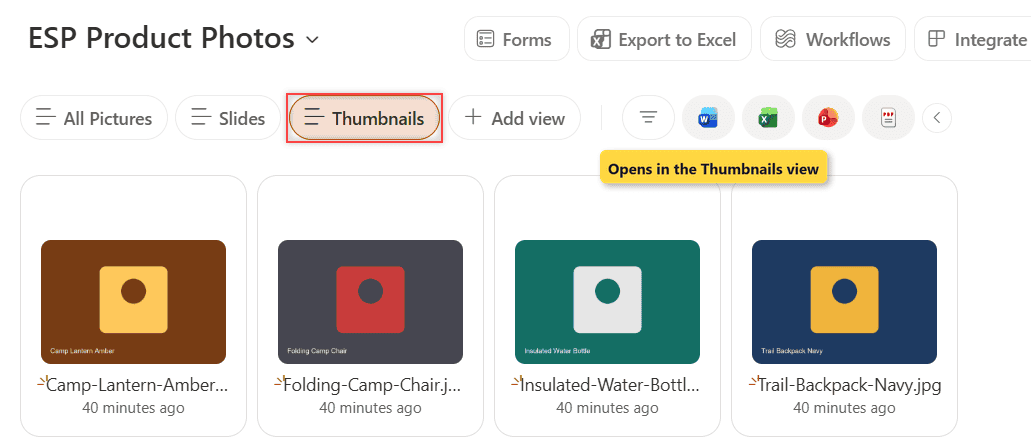
It opened in the modern experience on the Thumbnails view, with All Pictures and Slides views next to it. Versioning was off.
A document library in Tiles view does the same with versioning on; show the photos with the Image gallery web part.
Asset library and organization assets library
The classic asset library for images, audio and video wasn’t offered on my group-connected team site, and an admin can turn it off. Use the Media library template instead.
An organization assets library is a document library a SharePoint admin registers so everyone can pick approved images or Office templates; up to 30 per tenant, all on one site.
Form library (InfoPath)
A form library stores InfoPath XML forms. I could still create one (ESP Expense Forms), but there’s no point.
Microsoft blocked publishing new or updated InfoPath forms in SharePoint Online after May 18, 2026, and removes InfoPath Forms Services after July 14, 2026. Build new forms with a simple form in Power Apps instead.
Wiki page library
A wiki page library holds classic pages linked with [[double bracket]] links (Wiki Page content type). Modern pages do this better, so keep one only for old content.
System libraries you’ll see but shouldn’t use
- Style Library: classic branding files from older publishing sites.
- Form Templates: InfoPath form templates, now unused.
- Preservation Hold library: hidden; holds copies of edited or deleted files under retention.
Which library type should I use?
- Team files, contracts, reports: a document library.
- Photos and video: a document library, or the Media library template.
- Pages and news: Site Pages, through + New > Page.
- Forms: Power Apps or Microsoft Forms, not a form library.
A site collection holds up to 2,000 lists and libraries (SharePoint limits and boundaries). For different access, set unique permissions for the library instead of a new site.
If you’re setting up libraries for a team, these help next:
Frequently Asked Questions
How many types of libraries are there in SharePoint?
A SharePoint Online team site has three everyday types (document library, Site Pages, Site Assets), three classic types (picture, form, wiki page) and a few system libraries.
What is the default library in SharePoint?
Every new site gets a document library named Documents, stored at /Shared Documents. To add more, follow Microsoft’s Create a document library guide.
Can I change a library’s type after I create it?
No. The template is fixed at creation, so create a new library of the right type and use Move to.

I have worked with Microsoft technologies for more than 18 years, including SharePoint, Microsoft 365 and the Power Platform (Power Apps, Power Automate and Power BI), at companies like HP, TCS and KPIT. I started EnjoySharePoint in 2011 to share the solutions I build in real projects with readers in the United States, Canada, the United Kingdom, Australia, New Zealand and beyond. Microsoft has recognized this work with the Microsoft MVP award 13 times since 2014.