
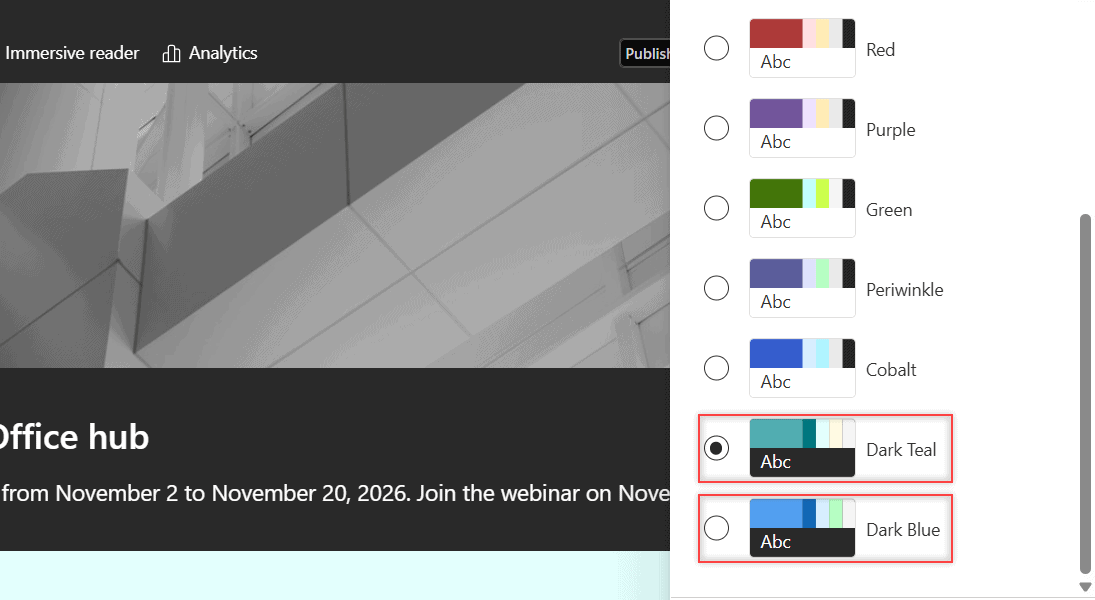
SharePoint dark mode isn’t a personal switch. A site owner applies a dark site theme instead: go to Settings > Change the look > Theme, pick Dark Teal or Dark Blue, and select Save. If those two themes are missing, an admin can check whether default themes are hidden:
Connect-SPOService -Url https://<tenant>-admin.sharepoint.com
Get-SPOHideDefaultThemes
It returns False when the Microsoft themes, including the dark ones, show up in the theme picker.
In this tutorial, I’ll show you how to get sharepoint dark mode on a site, what a dark theme changes, and where real dark mode toggles exist: the SharePoint admin center, OneDrive, Office for the web, Outlook and the mobile app.
Quick answer: SharePoint sites have no per-user dark mode. A site owner can apply the Dark Teal or Dark Blue theme from Change the look, and it changes the site for everyone. OneDrive, Word for the web, Outlook and the SharePoint admin center do have their own dark mode settings.
Is there a dark mode in SharePoint?
Not for sites. There’s no toggle that turns SharePoint dark for you alone. The site theme decides how it looks, and Microsoft documents no personal dark setting for site pages.
What SharePoint has are two dark themes, Dark Teal and Dark Blue. They arrived in early 2026, next to eight light themes. A theme is a site setting, so you need to be a SharePoint site owner to change it.
How to apply a dark theme to a SharePoint site
I tried this on a demo subsite, ESP Dark Mode Demo:
- Open the site and select Settings (the gear icon) at the top right.
- Select Change the look, then Theme.
- Scroll to the end of the list and pick Dark Teal or Dark Blue. It previews right away.
- Select Save to keep it, or Cancel to go back to the old theme.
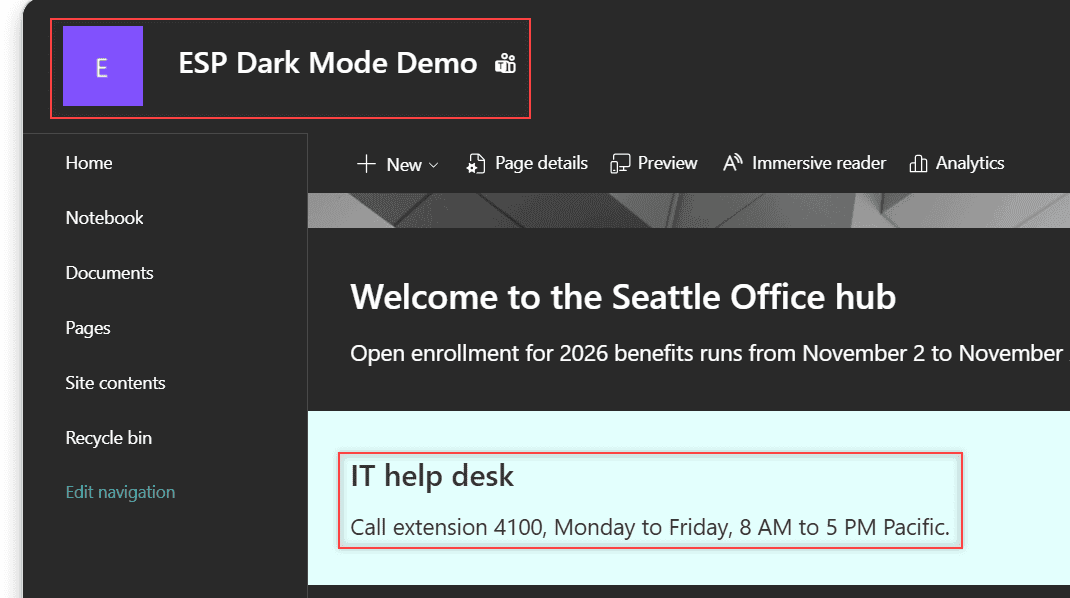
After I saved Dark Teal, the header, navigation and page background turned dark:
The theme applies to everyone, so tell your team first. For a matching logo, see changing the SharePoint site logo.
What does a dark theme change?
Theme colors apply to the header, footer, section backgrounds, the Text web part and Design Ideas. Text switches to black or white automatically, so it stays readable.
Images and embedded documents keep their own colors, so check that your logo still shows. On my demo page, the Text web part text turned white on a charcoal background. A section with strong emphasis did the opposite: it turned light cyan with dark text.
If the old colors still show after you save, the browser may be holding on to them. Clearing the SharePoint cache usually fixes that. Next, customize the rest of the home page.
Why can’t I see Dark Teal or Dark Blue?
There are three usual reasons:
- You’re not an owner. Members don’t see Change the look at all.
- Your admin hid the default themes. Then only company-approved themes appear in the list.
- The site uses the classic experience. Classic sites use different Change the look options.
For the second case, an admin can bring all Microsoft themes back with one line:
Set-SPOHideDefaultThemes $falseDon’t expect PnP’s Set-PnPWebTheme to apply Dark Teal. I tried it on the subsite and got ThemeNotFoundWhenSetThemeToWeb, because it only applies custom tenant themes. A custom dark brand theme can be built in the SharePoint brand center.
Dark mode in the SharePoint admin center
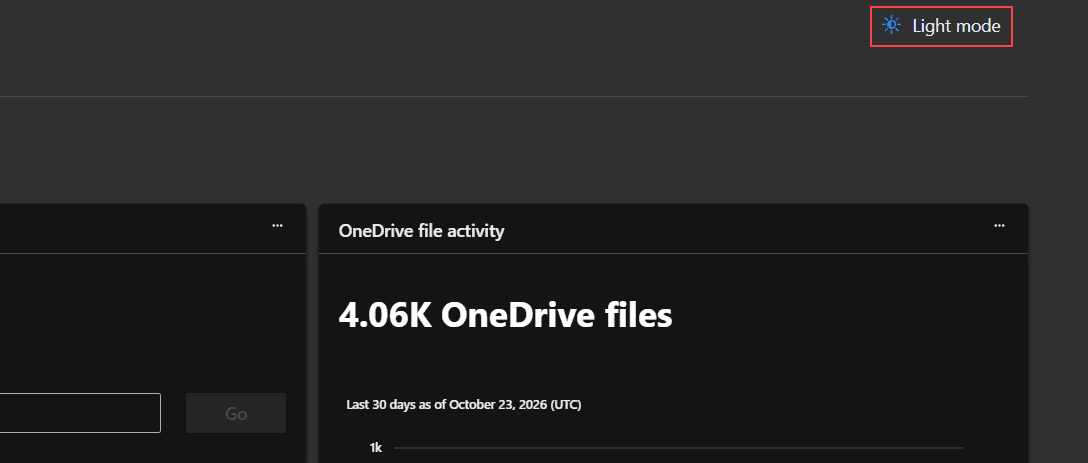
Admins do get a real toggle. Since February 2026, the SharePoint admin center has a Dark mode button at the top right of the home page. Once it’s on, the button reads Light mode. It changes only your view of the admin center, not any site. It won’t restyle a team site or communication site either.
OneDrive, Office for the web and Outlook dark mode
Each of these apps has its own setting, and none of them changes your SharePoint site. Here’s how OneDrive and SharePoint differ if you’re not sure which one you’re in.
| App | Where to turn on dark mode |
|---|---|
| OneDrive on the web (work or school) | Settings (gear) > Dark Mode toggle |
| OneDrive on the web (personal) | Settings > Theme > Dark or Follow system theme |
| Word for the web | View > Dark Mode (on by default if your browser or OS is dark) |
| Outlook on the web and new Outlook | Settings > General > Appearance > Dark |
| Office desktop apps | File > Account > Office Theme > Black |
Word’s setting doesn’t sync between the web, Windows and Mac, so turn it on once per platform.
Does the SharePoint mobile app have dark mode?
Yes, in the new SharePoint mobile app. Microsoft is rolling it out to iOS first, then Android, between late October and the end of November 2026. Not sure which app holds a file? See OneDrive vs SharePoint vs Teams.
More ways to shape how your SharePoint site looks:
Frequently Asked Questions
Can I turn on SharePoint dark mode just for myself?
No. SharePoint sites don’t have a personal dark mode. The Dark Teal and Dark Blue themes change the site for everyone, and only a site owner can apply them.
Which SharePoint themes are dark?
Dark Teal and Dark Blue. The other eight default themes, such as Teal, Blue and Cobalt, are light. Microsoft lists them all in its SharePoint site theme guide.
How do I turn off a SharePoint dark theme?
Go to Settings, select Change the look, then Theme, pick a light theme such as Teal or Blue, and select Save.

I have worked with Microsoft technologies for more than 18 years, including SharePoint, Microsoft 365 and the Power Platform (Power Apps, Power Automate and Power BI), at companies like HP, TCS and KPIT. I started EnjoySharePoint in 2011 to share the solutions I build in real projects with readers in the United States, Canada, the United Kingdom, Australia, New Zealand and beyond. Microsoft has recognized this work with the Microsoft MVP award 13 times since 2014.