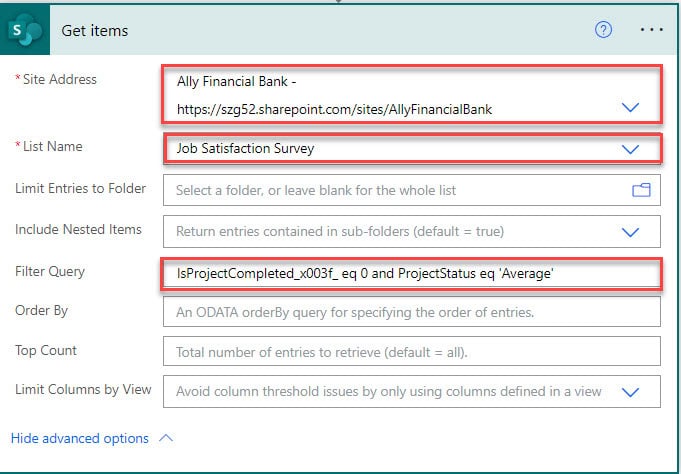
Power Automate OData Filter Query Yes/No (Boolean) Column

Power Automate OData Filter Query Yes/No

Have you started working with the Power Automate OData filter query? In this tutorial, I have explained how to use the Power Automate filter query boolean value, especially an example of “Power Automate OData Filter Query Yes/No“. To filter items from a SharePoint list by using the Power Automate OData Filter Query Yes/No, a user … Read more >>>

How to Check Condition Contains String in Power Automate?

Check Condition Contains String in Power Automate

Do you want to check whether a string contains a value in Power Automate? This Power Automate tutorial will help you check whether the string contains a value or not using the contains function in Power Automate. Scenario: Recently, I got a requirement to check whether the particular field value contains the string using Power … Read more >>>

Power Automate Contains() Function

Power Automate Contains() Function

This Power Automate tutorial explains how to use the Power Automate contains() function. I will show you the contains() Power Automate string function with syntax and examples. In addition, I will explain how to use this contains() function in a Power Automate flow based on a SharePoint list. Power Automate Contains() Function Microsoft provides many … Read more >>>

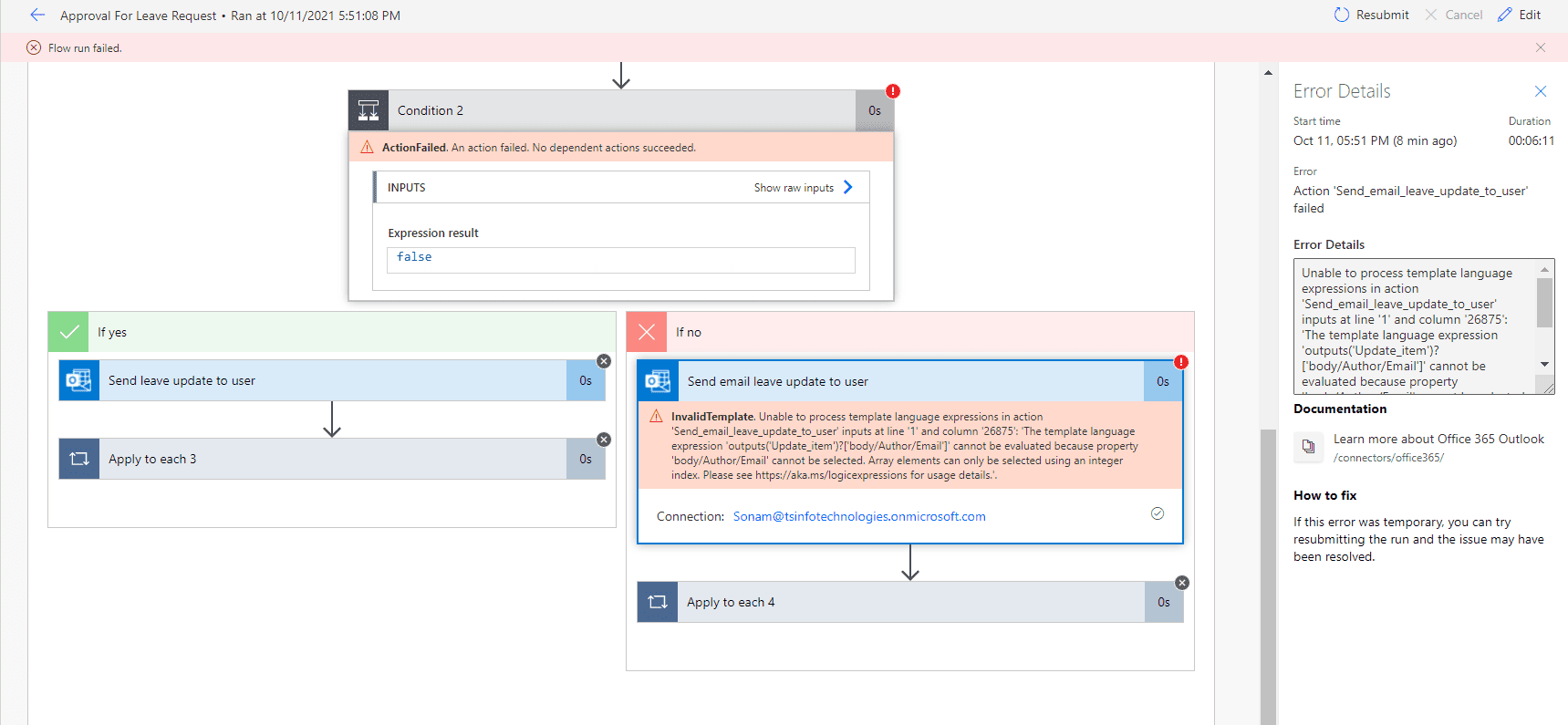
Unable to process template language expressions in action Power Automate

Unable to process template language expressions in action Power Automate

In this Microsoft Power Automate tutorial, we will discuss fixing the “Unable to process template language expressions in action” error on Power Automate. Recently, we got this error when we worked on a leave request workflow( a multilevel automated flow ). On that flow, we created 2 levels of approval: manager-level approval and another one … Read more >>>

How to Stop Flow in Power Automate?

Stop Flow in Power Automate

Do you want to stop a flow in Power Automate? The tutorial will help you understand stop flow by using the cancel flow run action and terminate control in Power Automate flow with different examples. Scenario: Recently, I received a requirement to check if the Product Quantity is greater than or equal to 10 and … Read more >>>

How to Get the First Character from a String in Power Automate?

get first character from string in power automate flow

Do you need to get the first character from a string in Power Automate? Then, this Power Automate tutorial will help you to get the first character from a String in Power Automate flow. We will learn: Scenario: While working on the product development, I needed to get the first character from the string using … Read more >>>

How to Change Trigger in Power Automate [3 Different ways]

Change Trigger in Power Automate

Sometimes, you might need to change the trigger of a flow in Power Automate. In this tutorial, I have explained how to change trigger in Power Automate using different ways. Suppose there is a flow and the trigger is “When an item is created or modified,” and later, you want to change it to “When … Read more >>>

>

Live Webinar: Quiz Application using SharePoint Framework (SPFx)

Join this free live session and learn how to build a Quiz application using SharePoint Framework (SPFx).

📅 2nd June 2026 – 10:00 AM EST | 7:30 PM IST

Build a High-Performance Project Management Site in SharePoint Online

User registration Power Apps canvas app

DOWNLOAD USER REGISTRATION POWER APPS CANVAS APP

Download a fully functional Power Apps Canvas App (with Power Automate): User Registration App

Power Platform Tutorial FREE PDF Download

FREE Power Platform Tutorial PDF

Download 135 Pages FREE PDF on Microsoft Power Platform Tutorial. Learn Now…