
If you need to share a link to someone’s files, migrate their content or set up a flow, you need their OneDrive address, and it’s always a SharePoint URL ending in /personal/ plus their sign-in name. The tricky part is getting it exactly right.
In this tutorial, I’ll show you five ways to find the OneDrive URL of user accounts, from copying your own in a few clicks to looking up anyone in your organization as an admin. I tested each one in my own Microsoft 365 tenant.
The sample accounts we’ll use
I ran every lookup against my own account, and I’ll use three made-up people at a company called yourcompany to show the patterns:
- Jordan Ellis – jordan.ellis@yourcompany.com, a normal custom-domain account.
- Maria Torres – maria.torres@yourcompany.onmicrosoft.com, still on the default onmicrosoft.com domain.
- Kevin Brooks – kbrooks@yourcompany.com, a new hire who hasn’t opened OneDrive yet.
Kevin is the tricky one. His OneDrive doesn’t exist yet, so some methods return nothing for him. (If you’re fuzzy on how OneDrive relates to team sites, see OneDrive vs SharePoint vs Teams.)
Method 1: Copy your OneDrive URL from OneDrive settings (Recommended)
The new OneDrive web app no longer shows it in the address bar (mine showed only yourcompany-my.sharepoint.com/my), but the settings page does:
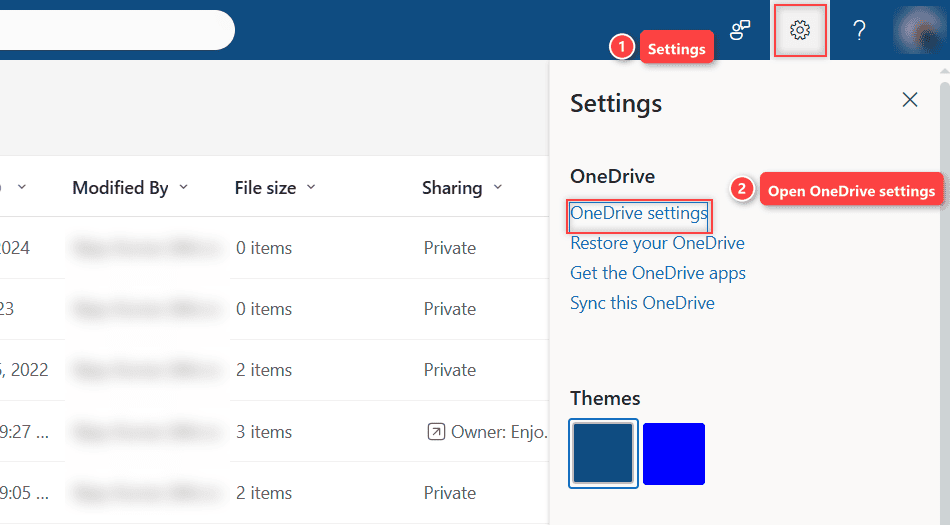
- Open OneDrive on the web and select the Settings gear at the top right.
- In the Settings pane, under OneDrive, select OneDrive settings.
- Select More Settings in the left pane.
- Scroll to Diagnostic information and right-click the OneDrive web URL link to copy it.
Here’s the Diagnostic information section at the bottom of More Settings:
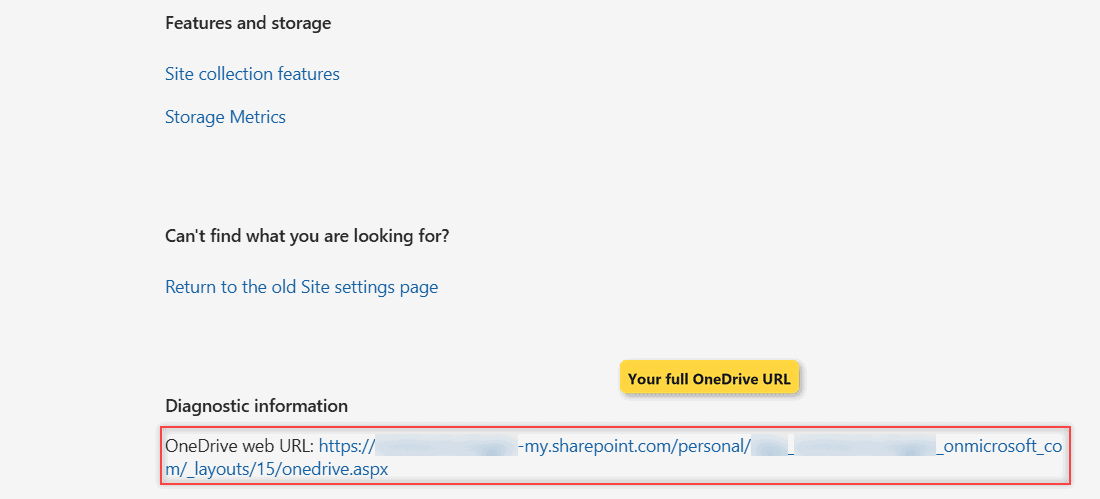
For Jordan, the copied link would look like this. Drop the /_layouts/15/onedrive.aspx part to get the site URL:
https://yourcompany-my.sharepoint.com/personal/jordan_ellis_yourcompany_com/_layouts/15/onedrive.aspxHow does this work?
Every OneDrive is a personal SharePoint site on the -my.sharepoint.com host. The /personal/jordan_ellis_yourcompany_com part is Jordan’s site, and onedrive.aspx is just the page that lists his files, the same files you sync or add as a shortcut.
Method 2: Build the OneDrive URL from the user principal name
Need someone else’s URL and you’re not an admin? You can usually build it. Take the user principal name (UPN, the sign-in email) and swap every period, comma, space and @ sign for an underscore.
| User | UPN | OneDrive URL |
|---|---|---|
| Jordan Ellis | jordan.ellis@yourcompany.com | https://yourcompany-my.sharepoint.com/personal/jordan_ellis_yourcompany_com |
| Maria Torres | maria.torres@yourcompany.onmicrosoft.com | https://yourcompany-my.sharepoint.com/personal/maria_torres_yourcompany_onmicrosoft_com |
| Kevin Brooks | kbrooks@yourcompany.com | https://yourcompany-my.sharepoint.com/personal/kbrooks_yourcompany_com (not created yet) |
How does this work?
The host is your tenant name plus -my. The folder after /personal/ is the UPN with the special characters replaced.
Important: this is a pattern, not a guarantee. Microsoft can add numbers or a GUID when two accounts would collide, the URL changes when the UPN changes, and Kevin’s URL won’t open until he visits OneDrive once.
Don’t know the exact UPN? My guide on how to get a user email address in Power Automate covers the lookups.
Method 3: Find any user’s URL in the OneDrive usage report
For admins, this is the fastest way to see everyone’s URL at once. You need the SharePoint Administrator or Reports Reader role.
- Open the Microsoft 365 admin center and go to Reports > Usage.
- Select the OneDrive report (under OneDrive files, select View more).
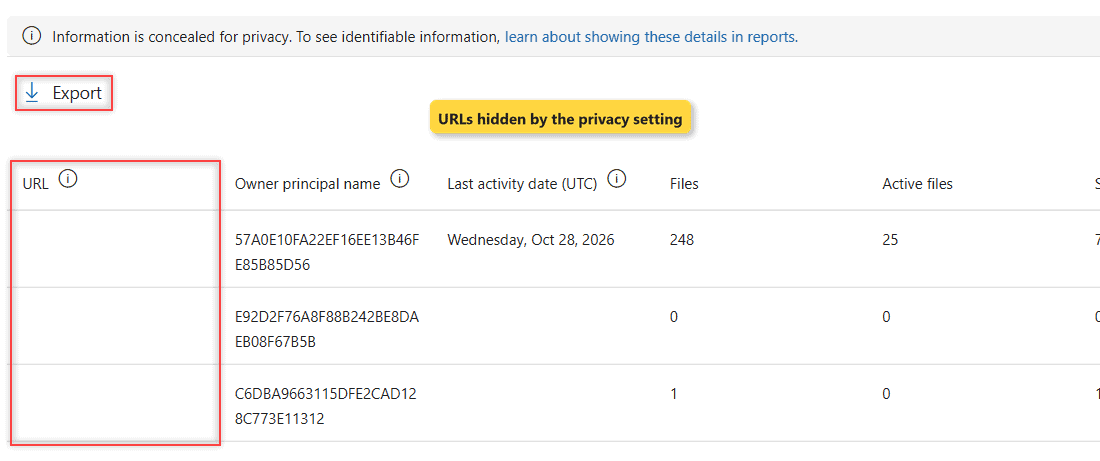
- Scroll to the table below the charts and copy the value from the URL column.
- To search all of them, select Export at the upper left of the table and open the .csv file.
How does this work?
With the same three users, Kevin wouldn’t appear, because the report only lists OneDrives that exist.
My tenant hides user details, so the URL column was blank and owners showed as codes. To see URLs, an admin clears In all reports, display deidentified names for users, groups, and sites in the Reports settings.
Method 4: Open a user’s OneDrive from the Microsoft 365 admin center
When you need someone’s files, say after they leave, the admin center opens their OneDrive for you.
- Go to Users > Active users and select the user.
- In the user panel, select the OneDrive tab.
- Under Get access to files, select Create link to files, then select the link.
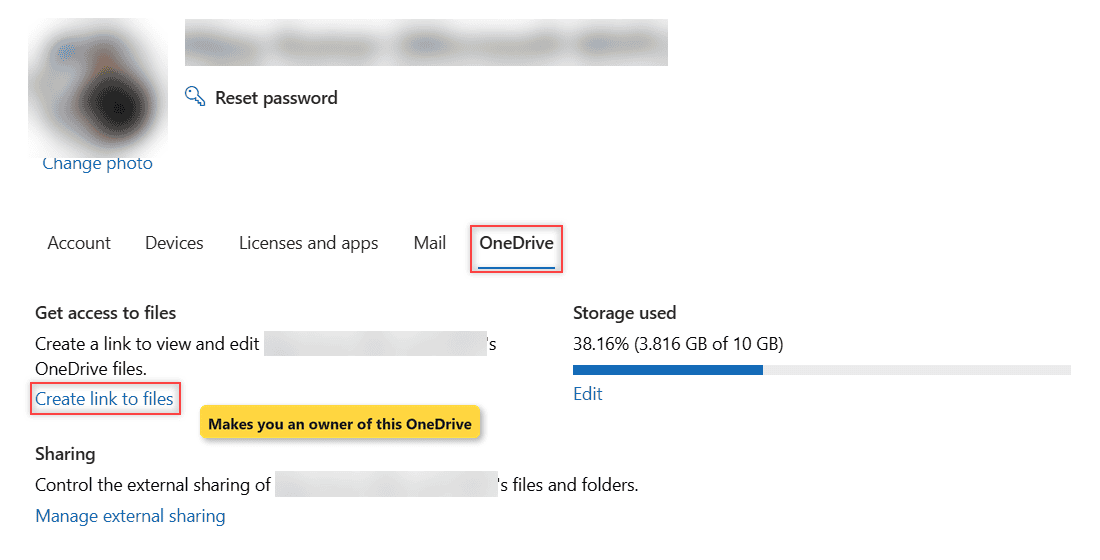
The OneDrive tab also shows Storage used (mine said 38.16%, 3.816 GB of 10 GB) and a Manage external sharing link. If a user runs out of room, see my fix for the quota exceeded error.
Important: Create link to files makes you an owner of that OneDrive. Remove yourself later under More features > User profiles > Manage User Profiles in the SharePoint admin center.
Once you’re in, you can move files from OneDrive to SharePoint so the team keeps them. This tab isn’t available for multi-geo tenants.
Method 5: Get the URL with the SharePoint REST API
The user profile service stores each OneDrive address in a property called PersonalUrl. Paste this into the browser to see your own:
https://yourcompany.sharepoint.com/_api/SP.UserProfiles.PeopleManager/GetMyProperties?$select=PersonalUrlFor another person, pass their encoded account name. Here it is for Jordan:
https://yourcompany.sharepoint.com/_api/SP.UserProfiles.PeopleManager/GetPropertiesFor(accountName=@v)?@v='i%3A0%23.f%7Cmembership%7Cjordan.ellis%40yourcompany.com'&$select=PersonalUrl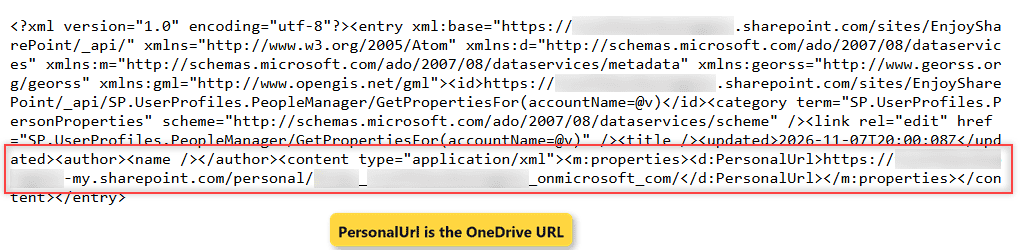
How does this work?
The account name is the claims login i:0#.f|membership| plus the UPN, URL-encoded. My lookup returned the personal URL with a trailing slash, and a made-up UPN returned null instead of an error.
To use it in a flow, I built ESP OneDrive URL Lookup: a manual trigger with an Email text input, then Send an HTTP request to SharePoint (Method GET, header Accept = application/json;odata=nometadata) with this Uri:
_api/SP.UserProfiles.PeopleManager/GetPropertiesFor(accountName=@v)?@v='@{encodeUriComponent(concat('i:0#.f|membership|', triggerBody()?['text']))}'&$select=PersonalUrlA Compose action named OneDrive URL then reads the value:
body('Send_an_HTTP_request_to_SharePoint')?['PersonalUrl']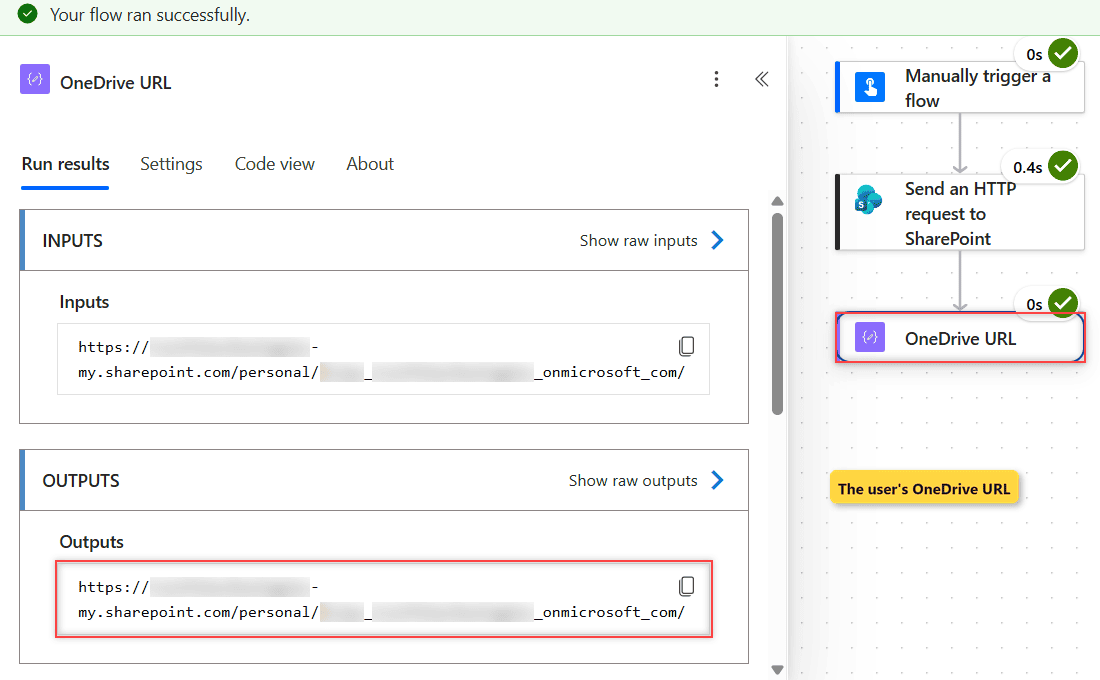
With my own email, the run returned my personal URL in 603 ms. Same three users again: Kevin’s made-up address still ran successfully, but the output was empty, so check for that.
Pro Tip: Pair this with Office 365 user profile details in Power Apps to show each person’s OneDrive link in an app.
Which method should you use?
| You want | Use |
|---|---|
| Your own URL, right now | Method 1: OneDrive settings |
| Someone else’s URL, no admin rights | Method 2: build it from the UPN, then test it |
| Everyone’s URLs in one file | Method 3: OneDrive usage report + Export |
| Into a former employee’s files | Method 4: admin center OneDrive tab |
| The URL inside a flow or app | Method 5: REST API or a flow |
Things to Keep in Mind
- No URL before first sign-in: a OneDrive isn’t created until the user opens it, unless an admin pre-provisions it.
- Renamed users get new URLs: when a UPN changes, the OneDrive URL changes too, so update saved links and flows.
- Opening isn’t access: knowing the URL doesn’t give you permission. People still need a share, as covered in sharing is limited on this item.
If you’re working with OneDrive files, these will help next:
Frequently Asked Questions
What is the format of a OneDrive URL?
It’s https://yourcompany-my.sharepoint.com/personal/ followed by the user principal name, with periods, commas, spaces and the @ sign replaced by underscores. For jordan.ellis@yourcompany.com that’s /personal/jordan_ellis_yourcompany_com.
Why can’t I find a user’s OneDrive URL?
The user probably hasn’t opened OneDrive yet, so the site doesn’t exist. Ask them to sign in to OneDrive once, or have an admin pre-provision it.
Can a regular user see someone else’s OneDrive URL?
You can build it from their UPN, but you can only open files they’ve shared with you.
How do I get a user’s OneDrive URL with PowerShell?
With PnP PowerShell, run the command below. Microsoft lists it with the other methods in its OneDrive URLs article.Get-PnPUserProfileProperty -Account "jordan.ellis@yourcompany.com" | Select-Object -ExpandProperty PersonalUrl

I have worked with Microsoft technologies for more than 18 years, including SharePoint, Microsoft 365 and the Power Platform (Power Apps, Power Automate and Power BI), at companies like HP, TCS and KPIT. I started EnjoySharePoint in 2011 to share the solutions I build in real projects with readers in the United States, Canada, the United Kingdom, Australia, New Zealand and beyond. Microsoft has recognized this work with the Microsoft MVP award 13 times since 2014.