Power BI Slicer Default Value: 5 Methods That Actually Work

How to set default slicer value in Power BI

Here’s something that trips up almost every Power BI beginner — and honestly, quite a few experienced users too: Power BI doesn’t have a simple “set default value” toggle for slicers. There’s no button you click and walk away from. Instead, you have to use one of a few clever workarounds, and the right one depends entirely … Read more >>>

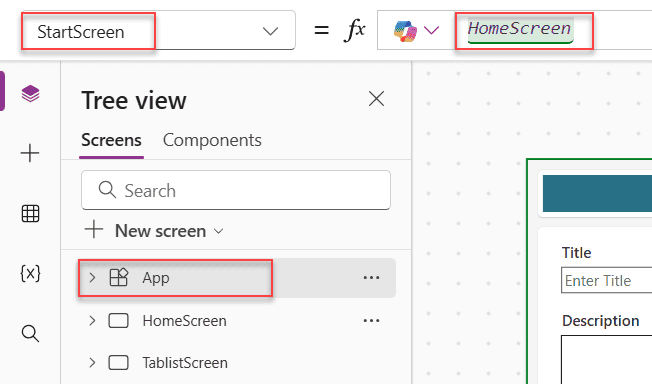
Power Apps App.StartScreen [Guide to Setting Your Start Screen]

tree view in canvas app

If you’ve ever opened a Power Apps canvas app and wondered why it’s landing on the wrong screen — or why your app feels slow to load — this tutorial is for you. I’m going to walk you through everything about the Power Apps App.StartScreen property: what it is, how it works, how it differs from App.OnStart, and … Read more >>>

Power Automate Apply to Each: Get Current Item, ID, Value & Index

How to Get the Current Item in Power Automate Apply to Each

Apply to Each is one of the most used actions in Power Automate — and honestly, one of the most misunderstood. I’ve seen flows silently break, process thousands of unnecessary API calls, or return null values, all because of a small misstep in this loop. In this tutorial, I’ll walk you through everything you need to … Read more >>>

Power Automate Filter Query If Blank [All Column Types]

Power Automate Filter Query If Blank

If your Power Automate flow is returning all list items instead of just the ones with empty fields — or throwing a cryptic error when you try to filter for blank values — you’re not alone. This is one of the most common stumbling blocks I see when people start working with the Get items action in … Read more >>>

>
SPGUIDES.ACADEMY
LEARN. BUILD. TRANSFORM.
Live FREE Webinar

Build an AI-Powered
Invoice Processing
App

Learn how to build an intelligent invoice processing solution using:

S SharePoint
Power Apps
Power Automate
Copilot Studio
PDF INVOICE
AI
S
From Invoice
to Insights
Invoice Processing ↑ Upload Invoice
INVOICE
TOTAL $1,950.00
Extracted Information
Vendor Name Contoso Ltd.
Invoice Number INV-1001
Invoice Date 09/05/2026
Due Date 09/25/2026
Line Items
Laptop 2 $1,600.00
Mouse 5 $150.00
✓ Save to SharePoint
DATE 22nd September 2026
TIME 10:00 AM EST 7:30 PM IST
DURATION 60 Minutes
🚀 Save Your Free Seat

Live Webinar

SharePoint Integration Power Apps Form With Repeating Table [Invoice Management System]

Learn how to build a real-world Invoice Management System using a SharePoint Integration Power Apps Form with a repeating table—supporting multiple invoice line items.

📅 2nd September 2026 – 10:00 AM EST | 7:30 PM IST

Build a High-Performance Project Management Site in SharePoint Online

User registration Power Apps canvas app

DOWNLOAD USER REGISTRATION POWER APPS CANVAS APP

Download a fully functional Power Apps Canvas App (with Power Automate): User Registration App

Power Platform Tutorial FREE PDF Download

FREE Power Platform Tutorial PDF

Download 135 Pages FREE PDF on Microsoft Power Platform Tutorial. Learn Now…