
If you are working in REST API in SharePoint, then you might face an error as: ‘The security validation for this page is invalid and might be corrupted. Please use your web browser’s back button to try your operation again.’ I will show you how to fix it.
We will learn why this error occurs and how to fix it: “the security validation for this page is invalid and might be corrupted,” as well as its solution.
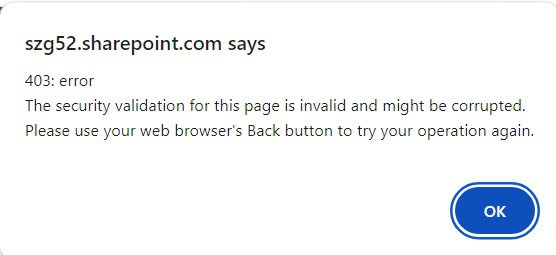
The security validation for this page is invalid and might be corrupted
I have a SharePoint list named Project as shown below. When I was creating an item in the list using the SharePoint REST API, I encountered the error: ‘The security validation for this page is invalid and might be corrupted.’ Please use your web browser’s back button to try your operation again.

To create a list item in the SharePoint Project List, I have used the following REST API code:
<script src="https://ajax.googleapis.com/ajax/libs/jquery/3.5.1/jquery.min.js"></script>
<script>
    $(document).ready(function() {
        $("#createProjectBtn").click(function(event) {
            event.preventDefault();

            var productName = $("#productName").val();
            var status = $("#status").val();

            createProjectListItem(productName, status);
        });
    });

    function createProjectListItem(productName, status) {
        var endpointUrl = "https://szg52.sharepoint.com/sites/Sales/_api/web/lists/getbytitle('Project')/items";

        var itemData = {
            "__metadata": { "type": "SP.Data.ProjectListItem" },
            "Title": productName,
            "Status": status
        };

        $.ajax({
            url: endpointUrl,
            type: "POST",
            contentType: "application/json;odata=verbose",
            data: JSON.stringify(itemData),
            headers: {
                "Accept": "application/json;odata=verbose",
            },
            success: function(data) {
                console.log("List item created successfully:", data);
            },
            error: function(xhr) {
                console.error("Failed to create list item:", xhr);
                var errorMessage = xhr.status + ': ' + xhr.statusText;
                if (xhr.responseJSON && xhr.responseJSON.error) {
                    errorMessage += '\n' + xhr.responseJSON.error.message.value;
                }
                alert(errorMessage);
            }
        });
    }
</script>
<h2>Create Project List Item</h2>
<form id="createProjectForm">
    <label for="productName">Product Name:</label>
    <input type="text" id="productName" name="productName"><br><br>

    <label for="status">Status:</label>
    <select id="status" name="status">
        <option value="New">New</option>
        <option value="Working On">Working On</option>
        <option value="Completed">Completed</option>
    </select><br><br>

    <button type="button" id="createProjectBtn">Create Project</button>
</form>
When I ran the code, I encountered the error below: The security validation for this page is invalid and may be corrupted.
This error typically occurs in SharePoint when the security validation token (X-RequestDigest) used in the AJAX request is either missing or invalid.
In the next section, we will see how to resolve this error: The security validation for this page is invalid and may be corrupted while working with the SharePoint REST API.
Solution:
If you mark this part in the above code, in the header of the Ajax Post request, we didn’t define the ‘X-RequestDigest.’ token. As the ‘X-RequestDigest’ validation token is missing from the code, it is throwing the error.
 $.ajax({
            url: endpointUrl,
            type: "POST",
            contentType: "application/json;odata=verbose",
            data: JSON.stringify(itemData),
            headers: {
                "Accept": "application/json;odata=verbose",

            }
To fix this error, we need to add the validation token, i.e., “X-RequestDigest”: $(“#__REQUESTDIGEST”).val(). The Ajax post request will look like this:
$.ajax({
            url: endpointUrl,
            type: "POST",
            contentType: "application/json;odata=verbose",
            data: JSON.stringify(itemData),
            headers: {
                "Accept": "application/json;odata=verbose",
               "X-RequestDigest": $("#__REQUESTDIGEST").val()
            }
This is how we can fix the error: ‘ The security validation for this page is invalid and might be corrupted. Please use your web browser’s back button to try your operation again.’
Conclusion
In this tutorial, we saw how to fix the error: the security validation for this page is invalid and might be corrupted. please use your web browser’s back button to try your operation again.
You may also like the following tutorials:
- How to Create a Folder in SharePoint using REST API?
- How to Get SharePoint List Items using REST API?
- microsoft.sharepoint.client.invalidclientqueryexception in SharePoint REST API
- How to Get Current User using SharePoint Rest API?
- An Entry Without a Type Name Was Found Rest API

After working for more than 18 years in Microsoft technologies like SharePoint, Microsoft 365, and Power Platform (Power Apps, Power Automate, and Power BI), I thought will share my SharePoint expertise knowledge with the world. Our audiences are from the United States, Canada, the United Kingdom, Australia, New Zealand, etc. For my expertise knowledge and SharePoint tutorials, Microsoft has been awarded a Microsoft SharePoint MVP (12 times). I have also worked in companies like HP, TCS, KPIT, etc.


Eta tathapi asuchi bhai kan kariba??
Au kichi syntax error achi ki?