Power Apps IsBlank: Check Blank Values in Your App

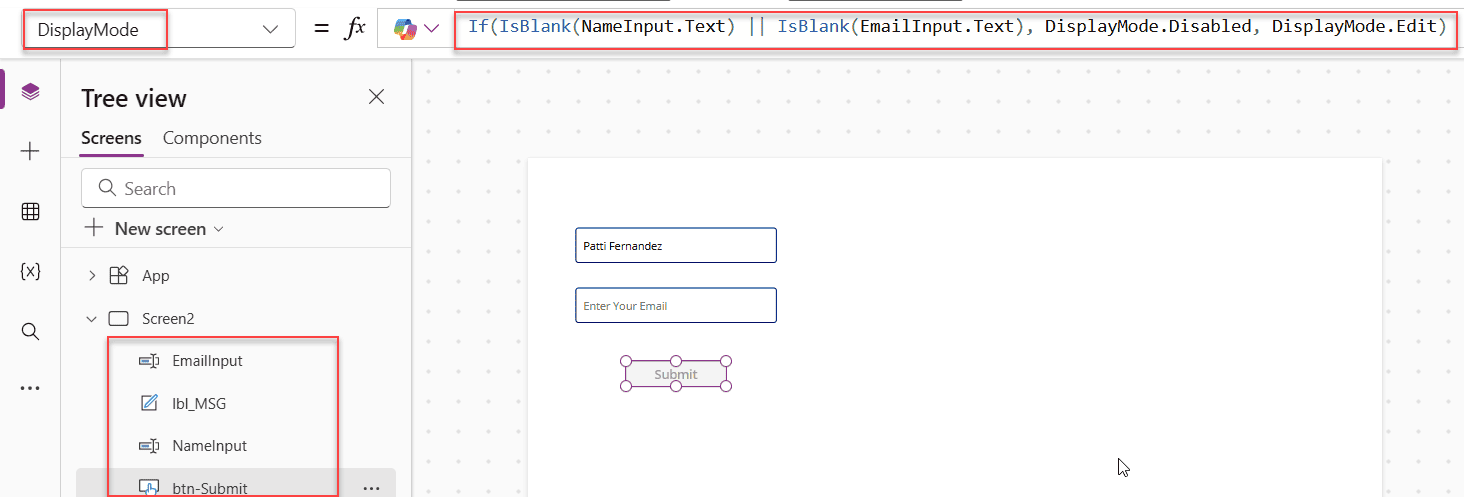
disable power apps button when the fields are empty

If you’ve spent any time building apps in Power Apps, you’ve almost certainly run into this situation: a user submits a form without filling in a required field, and your app breaks or saves garbage data. That’s exactly the problem IsBlank is designed to solve. In this tutorial, I’ll walk you through everything you need to know … Read more >>>

Last Function in Power Apps [With Real Examples]

Get the Last Record from a Power Apps Collection

If you’ve ever needed to grab the most recent entry from a SharePoint list, pull the last item a user submitted, or show the bottom few records in a gallery, the Last function in Power Apps is exactly what you need. In this tutorial, I’m going to walk you through everything: what the function does, how the … Read more >>>

Power Apps Concatenate Two Fields: 4 Easy Methods

Power Apps Concatenate Two Fields

If you’ve built even a basic Power Apps form that pulls data from a SharePoint list, you’ve probably run into this situation — you have a First Name field and a Last Name field, and you want to display them together as a full name somewhere on the screen. Or maybe you need to combine a city and a … Read more >>>

>
SPGUIDES.ACADEMY
LEARN. BUILD. TRANSFORM.
Live FREE Webinar

Build an AI-Powered
Invoice Processing
App

Learn how to build an intelligent invoice processing solution using:

S SharePoint
Power Apps
Power Automate
Copilot Studio
PDF INVOICE
AI
S
From Invoice
to Insights
Invoice Processing ↑ Upload Invoice
INVOICE
TOTAL $1,950.00
Extracted Information
Vendor Name Contoso Ltd.
Invoice Number INV-1001
Invoice Date 09/05/2026
Due Date 09/25/2026
Line Items
Laptop 2 $1,600.00
Mouse 5 $150.00
✓ Save to SharePoint
DATE 22nd September 2026
TIME 10:00 AM EST 7:30 PM IST
DURATION 60 Minutes
🚀 Save Your Free Seat

Live Webinar

SharePoint Integration Power Apps Form With Repeating Table [Invoice Management System]

Learn how to build a real-world Invoice Management System using a SharePoint Integration Power Apps Form with a repeating table—supporting multiple invoice line items.

📅 2nd September 2026 – 10:00 AM EST | 7:30 PM IST

Build a High-Performance Project Management Site in SharePoint Online

User registration Power Apps canvas app

DOWNLOAD USER REGISTRATION POWER APPS CANVAS APP

Download a fully functional Power Apps Canvas App (with Power Automate): User Registration App

Power Platform Tutorial FREE PDF Download

FREE Power Platform Tutorial PDF

Download 135 Pages FREE PDF on Microsoft Power Platform Tutorial. Learn Now…