
Are you getting the error “parsing odata select and expand failed”? In this tutorial, I will explain how to fix the error “parsing odata select and expand failed: an identifier was expected at position 0.” that comes while working with get manager v2 flow action in Power Automate.
Recently, I was using the get manager (v2) flow action to get the manager details in Power Automate.
The full error comes as Action ‘Get_manager_(V2)‘ failed. Error details: Parsing Select and Expand failed.

Parsing odata select and expand failed: an identifier was expected at position 0
Recently, for one of my requirements, I was using the Get Manager (V2) flow action to get the manager email of the user.
But I got the above error. I was using the flow action like the one below:
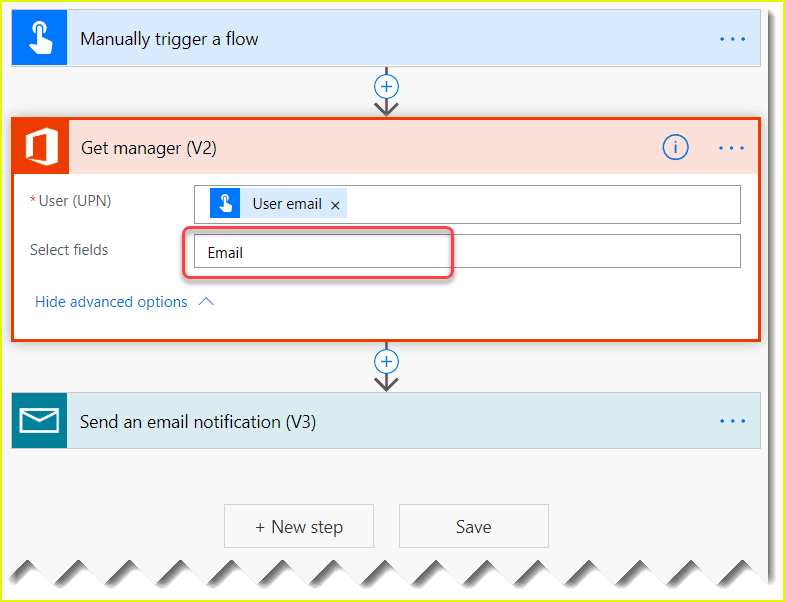
Get manager (V2) takes one parameter as User (UPN), which will take the User principal name or email ID.
It also optionally asks you to select fields where you can provide the parameters you want to retrieve.
I have added Email/Mail (I tried both), which was causing the issue.
To fix the issue, I removed the parameter from Select fields.
If you do not add anything in the Select fields, it will get all the parameters of the user’s manager. Properties like Mail, City, Country, Company name, Department, Display Name, Given Name, Hire Date, Job Title, Mobile Phone, Nickname, etc.
Now, the flow looks like below:

After this, I can get the manager name of the user in Power Automate.
This is how to fix the error parsing odata select and expand failed: an identifier was expected at position 0 that comes in Power Automate.
You may like:
- failed to create connection for connection id in Power Automate
- Power Automate: The credentials for this connection do not have access to. Please try using a different location or account
- Code View hyperlink rewritten: Send an email (V2) action Dynamic Content in Power Automate

After working for more than 18 years in Microsoft technologies like SharePoint, Microsoft 365, and Power Platform (Power Apps, Power Automate, and Power BI), I thought will share my SharePoint expertise knowledge with the world. Our audiences are from the United States, Canada, the United Kingdom, Australia, New Zealand, etc. For my expertise knowledge and SharePoint tutorials, Microsoft has been awarded a Microsoft SharePoint MVP (12 times). I have also worked in companies like HP, TCS, KPIT, etc.


It worked finally!!!!! Thanks!!!