How to Check SharePoint Version Using PowerShell

sharepoint version check powershell

If you are working as a SharePoint administrator, then you might need to check the SharePoint version for troubleshooting, patching, and ensuring compatibility with solutions or features. In this tutorial, I will explain how to check the SharePoint version using PowerShell. Check SharePoint On-Premises Version with PowerShell SharePoint on-premises (e.g., SharePoint 2013, 2016, 2019) stores … Read more >>>

PowerShell SharePoint Commands And Examples

PowerShell SharePoint Commands And Examples

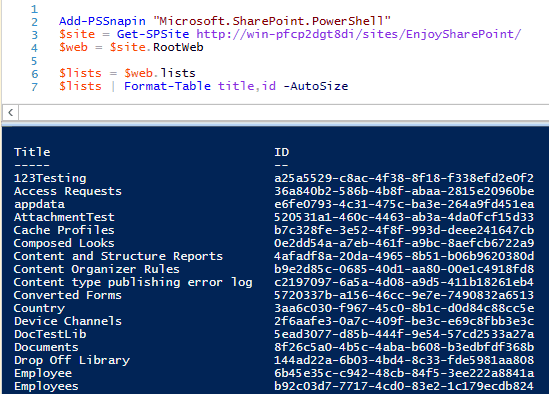
If you are a SharePoint developer, then you should have some expertise in PowerShell. Here, I will demonstrate some PowerShell examples related to SharePoint sites, lists, libraries, groups, etc. This tutorial covers PowerShell SharePoint commands and examples. The commands will work in SharePoint On-premises versions like SharePoint Server. For all PowerShell SharePoint commands, I use … Read more >>>

SharePoint ULS Logs For Monitoring and Troubleshooting

SharePoint ULS Logs

SharePoint’s Unified Logging System (ULS) is the main way to track events and errors in SharePoint environments. These logs capture diagnostic info at different levels, depending on your configuration. ULS logs are crucial for developers and admins when troubleshooting weird behaviors or problems in SharePoint Server and related apps. When SharePoint acts up, ULS logs … Read more >>>

Connect-PnPOnline : The term ‘Connect-PnPOnline’ is not recognized

connect-pnponline is not recognized

Are you getting the error “connect-pnponline not recognized” while working with PnP PowerShell? I recently received this error. Let me explain to you how to fix the error. The complete error comes as: Connect-PnPOnline: The term ‘Connect-PnPOnline’ is not recognized as the name of a cmdlet, function, script file, or operable program. In particular, I … Read more >>>

How to Get SharePoint List Name using PowerShell?

SharePoint 2013 Get SharePoint List or Document Library GUIDs using PowerShell

Do you want to get the SharePoint list name or GUID? You can use PowerShell for this. In this tutorial, I will show how to get the SharePoint list name from its list GUID using PowerShell. I will also explain how to get the SharePoint list GUID using PowerShell. The entire tutorial will be very … Read more >>>

How to Connect to SharePoint Online Using PowerShell

SharePoint Online PowerShell

As a SharePoint administrator, I’ve found that using PowerShell to manage SharePoint Online can save hours of tedious work. Whether you’re managing SharePoint sites, users, or content such as items or documents, PowerShell provides different cmdlets. In this tutorial, I will demonstrate various methods for connecting to SharePoint Online using PowerShell. Using SharePoint Online Management … Read more >>>

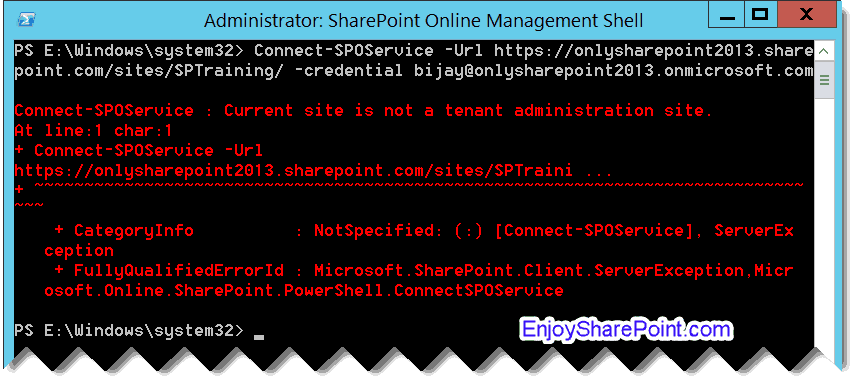
Connect-SPOService : current site is not a tenant administration site.

Connect-SPOService Current site is not a tenant administration site

When working with SharePoint Online using PowerShell, you may encounter the error message: “Connect-SPOService: Current site is not a tenant administration site.” This error occurs when you attempt to connect to SharePoint Online using an incorrect URL format. connect-sposervice : current site is not a tenant administration site Let me tell you the reason why … Read more >>>

>

Live Webinar: Quiz Application using SharePoint Framework (SPFx)

Join this free live session and learn how to build a Quiz application using SharePoint Framework (SPFx).

📅 2nd June 2026 – 10:00 AM EST | 7:30 PM IST

Build a High-Performance Project Management Site in SharePoint Online

User registration Power Apps canvas app

DOWNLOAD USER REGISTRATION POWER APPS CANVAS APP

Download a fully functional Power Apps Canvas App (with Power Automate): User Registration App

Power Platform Tutorial FREE PDF Download

FREE Power Platform Tutorial PDF

Download 135 Pages FREE PDF on Microsoft Power Platform Tutorial. Learn Now…