
Have you ever received an error message that says, “The property or field Url has not been initialized. It has not been requested, or the request has not been executed. It may need to be explicitly requested.”? I will show you how to fix the error.
The property or field Url has not been initialized
I was working with CSOM to get the web ID of a SharePoint site in a console application.
For this, I was writing the below code:
using (ClientContext context = new ClientContext(parentURL))
{
context.AuthenticationMode = ClientAuthenticationMode.Default;
context.Credentials = new SharePointOnlineCredentials(GetSPOAccountName(), GetSPOSecureStringPassword());
context.Load(context.Web, w => w.ServerRelativeUrl);
context.Load(context.Site.RootWeb, w => w.Id, w => w.Url);
context.Load(context.Web, w => w.Id);
string rootWebURL = context.Site.RootWeb.Url;
}
When I ran the above code, I received the below error message:
An unhandled exception of type ‘Microsoft.SharePoint.Client.PropertyOrFieldNotInitializedException’ occurred in Microsoft.SharePoint.Client.Runtime.dll
Additional information: The property or field ‘Url’ has not been initialized. It has not been requested or the request has not been executed. It may need to be explicitly requested.
It looks like below:
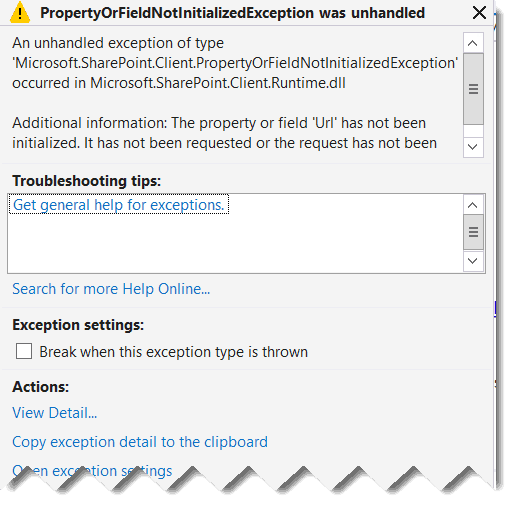
When I execute the above code, the above exception comes in the below line:
string rootWebURL = context.Site.RootWeb.Url;My mistake was not calling the ExecuteQuery() method after loading the properties.
context.ExecuteQuery();To fix the error, you can use the code below.
using (ClientContext context = new ClientContext(parentURL))
{
context.AuthenticationMode = ClientAuthenticationMode.Default;
context.Credentials = new SharePointOnlineCredentials(GetSPOAccountName(), GetSPOSecureStringPassword());
context.Load(context.Web, w => w.ServerRelativeUrl);
context.Load(context.Site.RootWeb, w => w.Id, w => w.Url);
context.Load(context.Web, w => w.Id);
context.ExecuteQuery();
string rootWebURL = context.Site.RootWeb.Url;
}
This PropertyOrFieldNotInitializedException occurs when you try to access a property of a SharePoint object that hasn’t been loaded into the client context yet.
In this way, you can fix the error. The property or field Url has not been initialized. It has not been requested or the request has not been executed. It may need to be an explicitly requested error in SharePoint.
You may also like the following tutorials:
- Your Organization’s Policies Don’t Allow You To Share With These Users While Sharing Files In SharePoint Online
- Gantt Chart View in SharePoint Online Modern List Using JSON
- SharePoint Check In Check Out
- SharePoint Document Library Examples

After working for more than 18 years in Microsoft technologies like SharePoint, Microsoft 365, and Power Platform (Power Apps, Power Automate, and Power BI), I thought will share my SharePoint expertise knowledge with the world. Our audiences are from the United States, Canada, the United Kingdom, Australia, New Zealand, etc. For my expertise knowledge and SharePoint tutorials, Microsoft has been awarded a Microsoft SharePoint MVP (12 times). I have also worked in companies like HP, TCS, KPIT, etc.

