
A property management company I work with runs a flow every morning that texts on-call maintenance staff. On weekends, it should text a different crew. The first version checked whether dayOfWeek() was greater than 5, and for three weeks, nobody on the weekend crew got a message on Sundays. In Power Automate, Sunday is 0, not 7.
In this tutorial, I’ll show you how dayOfWeek() works, how to turn the number into a day name, how to check for weekends, how to find the start of the week, and how to avoid the time zone problem that trips up most US flows.
Quick answer: dayOfWeek(timestamp) returns the day of the week as a number from 0 to 6, where Sunday is 0 and Saturday is 6. For today, use dayOfWeek(utcNow()). To get the name instead, use formatDateTime(utcNow(),'dddd'). Because utcNow() is UTC, convert it to your time zone first if the flow runs in the evening.
How dayOfWeek() works
The function takes one required parameter, a timestamp string, and returns an integer:
dayOfWeek('<timestamp>')| Day | Value |
|---|---|
| Sunday | 0 |
| Monday | 1 |
| Tuesday | 2 |
| Wednesday | 3 |
| Thursday | 4 |
| Friday | 5 |
| Saturday | 6 |
For example, dayOfWeek('2026-09-28T13:27:36Z') returns 1, because September 28, 2026, is a Monday, and dayOfWeek('2026-10-01T09:00:00Z') returns 4 for a Thursday. Use ISO dates (yyyy-MM-dd) in expressions so there’s no confusion between month and day.
Example 1: Get today’s day number
Create an instant cloud flow with Manually trigger a flow. You can put dayOfWeek(utcNow()) straight into a Compose action, but I’ll store the date in a variable first so you can swap in any date. Add Initialize variable named Day of week, type String, with the expression utcNow():

Add a Compose action with this expression:
dayOfWeek(variables('Day of week'))
Save the flow and test it. I ran it on a Tuesday, so the output is 2:

Example 2: Get the day name
The easiest way to get the name is formatDateTime with the dddd format, and you don’t need dayOfWeek() at all:
formatDateTime(utcNow(), 'dddd')For the short name (Tue), use 'ddd'. For another language, add a locale, for example formatDateTime(utcNow(), 'dddd', 'es-es') returns martes. The output for my Tuesday run:

Using an array of day names
Some tutorials look up the name in an array of days that starts with Monday and subtract 1 from dayOfWeek(). That fails on Sundays, because 0 minus 1 is -1, which isn’t a valid index. If you want an array, for custom labels for example, start it with Sunday and use the number directly:
Initialize variable: Week days (Array)
["Sunday","Monday","Tuesday","Wednesday","Thursday","Friday","Saturday"]

Compose:
variables('Week days')[dayOfWeek(utcNow())]
Example 3: Check whether today is a weekend
This is the check my client needed. Test for both 0 and 6:
or(equals(dayOfWeek(utcNow()), 0), equals(dayOfWeek(utcNow()), 6))In a Condition, put that expression on the left, choose is equal to, and enter true as an expression on the right. For weekdays only, check and(greater(dayOfWeek(utcNow()), 0), less(dayOfWeek(utcNow()), 6)).
If you only want a scheduled flow to run on certain days, you may not need an expression at all. The Recurrence trigger can run weekly on the days you pick. For more ideas, see how to check the day of the week in Power Automate.
Example 4: Find the first day of the week
There’s no startOfWeek() function, so subtract the day number from today. In the US, weeks usually start on Sunday:
formatDateTime(addDays(utcNow(), mul(-1, dayOfWeek(utcNow()))), 'yyyy-MM-dd')On Tuesday, September 29, 2026, that returns 2026-09-27, the Sunday before. For a Monday start, as in ISO weeks, shift the number so Monday is 0:
formatDateTime(addDays(utcNow(), mul(-1, mod(add(dayOfWeek(utcNow()), 6), 7))), 'yyyy-MM-dd')That returns 2026-09-28 for the same date, and it still works on Sundays, when it goes back six days. Format the result as a date, not as 'dddd'; the day name would always be Sunday or Monday, which tells you nothing.
Example 5: Get the weekday of a SharePoint date
Here’s a Task List with a date column called Task Deadline:

Create an automated cloud flow with When an item is created or modified and select the site and list:

Add Initialize variable named Task Deadline, type String, with the Task Deadline column as the value:
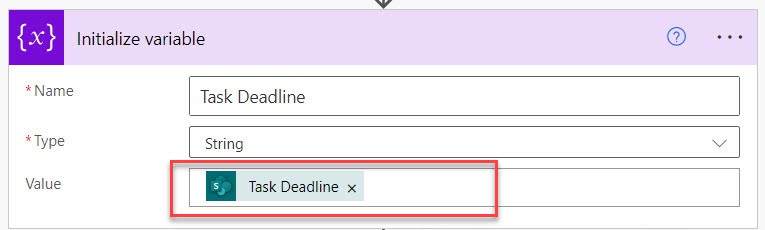
Then add a Compose with dayOfWeek(variables('Task Deadline')). Or skip the variable and use dayOfWeek(triggerBody()?['TaskDeadline']) with your column’s internal name:

Save, select Test > Manually, and then edit an item. I changed a deadline to 10/3/2026:

October 3, 2026, is a Saturday, so the output is 6:

If the column can be empty, dayOfWeek() fails on a blank value, so check it first with empty() in a Condition.
Use your local day, not UTC
utcNow() is UTC. At 8 PM Eastern on a Friday, it’s already Saturday in UTC, so dayOfWeek(utcNow()) returns 6. Convert to your time zone first:
dayOfWeek(convertTimeZone(utcNow(), 'UTC', 'Eastern Standard Time'))Use ‘Central Standard Time’, ‘Mountain Standard Time’ or ‘Pacific Standard Time’ as needed; daylight saving time is handled for you. The same applies to Date and Time columns from SharePoint, which arrive in UTC. See how to convert time zones in Power Automate for more.
These Power Automate date tutorials work well with dayOfWeek():
- Power Automate Date Functions [10+ Examples]
- How to Use formatDateTime() Function in Power Automate?
- Power Automate utcNow() Function [With Different Formats]
- Power Automate dayOfMonth() Function + Power Automate dayOfYear() function
- Power Automate addDays() Function + Examples
- How to Calculate the Last Working Day Of a Month Using Power Automate?
Frequently Asked Questions
What does dayOfWeek() return for Sunday in Power Automate?
It returns 0. Monday is 1 and Saturday is 6, as listed in Microsoft’s expression functions reference.
How do I get the day name in Power Automate?
Use formatDateTime(utcNow(),’dddd’) for the full name, or ‘ddd’ for the short name.
How do I check if a date is a weekend in Power Automate?
Use or(equals(dayOfWeek(date),0), equals(dayOfWeek(date),6)). Checking only greater than 5 misses Sunday.
Why does dayOfWeek() return the wrong day?
utcNow() is in UTC. In the evening in the US, UTC is already the next day. Convert with convertTimeZone first.

Preeti Sahu is a Microsoft MVP for Power Apps with over six years of experience working with SharePoint Online and the Power Platform. She is the co-author of the book Microsoft Power Platform: A Deep Dive. As a Power Platform developer, she has built various tools with Power Apps and Power Automate, and she makes Microsoft 365 videos for YouTube.