
I was building what should have been a five-minute flow for a SharePoint list: whenever someone adds an item, email the person named in the Approver column. The flow saved without complaint, but the very first test run failed with OpenApiOperationParameterTypeConversionFailed and this rather intimidating message:
The 'inputs.parameters' of workflow operation 'Send_an_email_(V2)' of type 'OpenApiConnection' is not valid. Error details: Input parameter 'emailMessage/To' is required to be of type 'String/email'. The runtime value '"Ganesh Yadav"' to be converted doesn't have the expected format 'string/email'.
Once you know how to read it, though, this error is one of the easiest to fix in Power Automate. It’s telling you that one of the address fields received something that isn’t a valid email address, and it even shows you the value it received.
Quick answer: The To, CC or BCC field of Send an email (V2) received a value that isn’t a valid email address, such as an empty value, a person’s display name, several addresses separated by commas, or an array. Use the person’s Email property instead of their display name, separate several addresses with semicolons, convert arrays to text with join(), and skip the email when the address is empty.
In this tutorial, I’ll show you how to read the error message, and then walk through each cause with the expression I use to fix it.
What does the “String/email” error mean?
In the Office 365 Outlook connector, the To, CC and BCC fields of Send an email (V2) have the type email. Microsoft’s connector reference describes them as email addresses “separated by semicolons”. Before the email is sent, Power Automate checks that the value really looks like one or more email addresses, and if it doesn’t, the run fails with this error.
The message itself contains three useful clues:
| Part of the message | What it tells you |
|---|---|
Send_an_email_(V2) | Which action failed. If your flow has several email actions, it may say Send_an_email_(V2)_2. |
emailMessage/To | Which field had the bad value. emailMessage/Cc or emailMessage/Bcc point to CC or BCC. |
The runtime value '...' | The exact value the flow passed. '' means it was empty; a person’s name means you used a display name. |
The quickest way to diagnose it is to open the failed run, select the Send an email (V2) action, and look at its inputs. The value shown in To, CC or BCC almost always points straight to the cause.
Cause 1: A display name instead of an email address
This was the cause in my flow. When I filled in the To field, I picked Approver of the item DisplayName from the dynamic content, because it was the first approver field in the list. That gave the flow the value “Ganesh Yadav”, which is a name, not an email address.
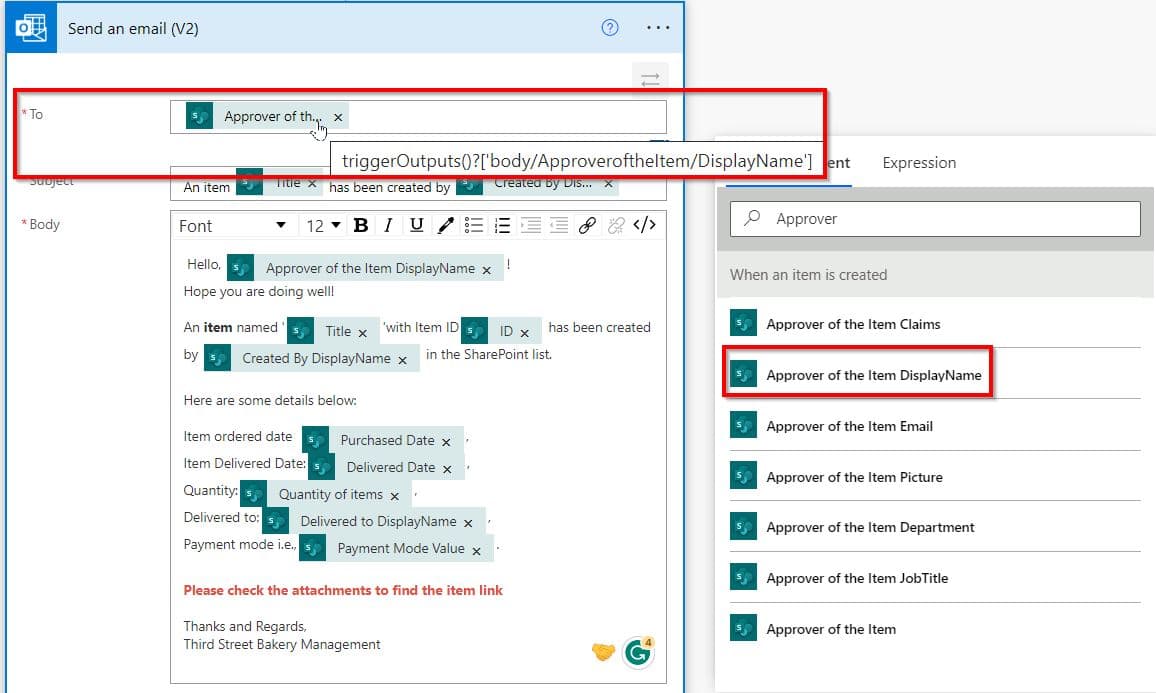
The fix is to remove that value and choose the Email property of the same person column instead, such as Approver Email. Behind the scenes, that’s the Email property of the person field:
triggerOutputs()?['body/Approver/Email']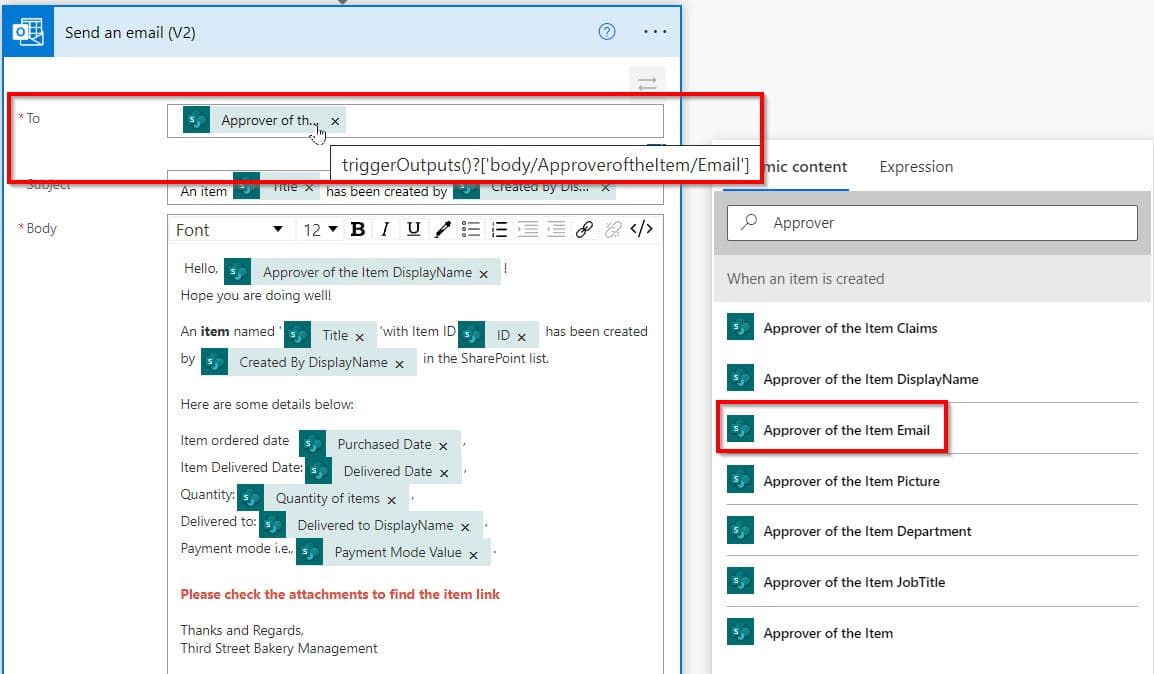
After saving the flow and testing it again, the run succeeded and the approver received the notification:

The same rule applies to Created By, Modified By and any other person field: always use its Email property, never DisplayName or Claims.
Cause 2: The address is empty
If the error shows The runtime value '""', the field was blank when the flow ran. This typically happens when an optional person column hasn’t been filled in, a Microsoft Forms question was skipped, or a variable was never set on one branch of the flow.
The cleanest fix is to check for an empty value before you send. Add a Condition with the expression below on the left, is equal to in the middle, and false on the right, then move Send an email (V2) into the True branch:
empty(triggerOutputs()?['body/Approver/Email'])Alternatively, you can send the email to a fallback address, such as a helpdesk mailbox, whenever the field is empty. Put this expression directly in the To field:
if(empty(triggerOutputs()?['body/Approver/Email']), 'helpdesk@contoso.com', triggerOutputs()?['body/Approver/Email'])You’ll often see coalesce() suggested for this, but be careful: it only replaces null values. An empty string isn’t null, so coalesce() passes it straight through and the email still fails. For blank fields, empty() or if() is the reliable choice.
Cause 3: Several addresses separated by commas
When you send to several people, the To, CC and BCC fields expect the addresses to be separated by semicolons. A value such as anna@contoso.com, ben@contoso.com fails the check. If your addresses come from text that uses commas, swap them for semicolons before sending:
replace(variables('Recipients'), ',', ';')Microsoft’s email troubleshooting guide recommends the same approach when one email should go to many people: build a string variable (not an array) that contains the addresses separated by semicolons.
Cause 4: An array instead of text
If a person column allows multiple selections, or you pass the output of a Select action, the value is an array, but the To field needs plain text. The fix is to turn the array into a semicolon-separated string in two steps. First, add a Select action, set From to the multi-select person column (for example triggerOutputs()?['body/Reviewers']), switch Map to text mode, and enter item()?['Email']. Then use this expression in the To field:
join(body('Select'), ';')The result is anna@contoso.com;ben@contoso.com, which the To field accepts without complaint.
Cause 5: Hidden spaces or line breaks
Addresses copied from a text column, an Excel file or an email body sometimes carry an invisible line break or trailing space. A Microsoft community moderator confirmed on Microsoft Q&A that a line break inside the address causes exactly this error. Cleaning the value before you use it solves it:
trim(replace(variables('Recipients'), decodeUriComponent('%0A'), ';'))Other Send an email (V2) errors you might see
A few related messages come up in the same situations, and they have similar fixes:
- Parameter ‘To’ cannot be null or empty. The To field has no value at all. Use the empty checks from Cause 2.
- The source type/format ‘Array’ … is not convertible to type/format ‘String/email’. You passed an array. Convert it with
join()as shown in Cause 4. - Parameter ‘Attachment Content’ cannot be null or empty. The attachment content is missing. Pass the file content from a Get file content action, which Microsoft’s troubleshooting guide describes.
- The error mentions emailMessage/From. Sending as another mailbox needs Send as or Send on behalf of permission on that mailbox.
Limits to keep in mind
The Office 365 Outlook connector allows up to 300 calls per connection every 60 seconds, and each email can be up to 49 MB. A flow that sends one email per item in a large list can hit the first limit surprisingly quickly, so where you can, combine recipients into a single email instead of sending one each.
Checklist before you test again
- The To, CC and BCC fields use Email properties, not display names.
- Several addresses are separated by semicolons, not commas.
- Arrays are converted to text with
join(). - The flow skips the email, or uses a fallback address, when the address is empty.
- Addresses that come from text or Excel are cleaned with
trim()andreplace().
For more on sending email from Power Automate, take a look at these guides:
- How to Use Power Automate Send an Email (V2) Action?
- How to Send Emails to Multiple Recipients from a SharePoint List Using Power Automate?
- How to Send Email to SharePoint Group in Power Automate?
- Power Automate Send Email From Shared Mailbox
- How to Send a No Reply Email from a Specific Sender Name in Power Automate?
- Get User Email Address in Power Automate [5 Best Methods]
Frequently Asked Questions
What does “Input parameter ’emailMessage/To’ is required to be of type ‘String/email’” mean?
The To field of Send an email (V2) received a value that isn’t a valid email address, such as an empty value, a display name or addresses separated by commas. Power Automate checks the format before sending and fails the run.
How do I fix OpenApiOperationParameterTypeConversionFailed in Send an email (V2)?
Look at the runtime value in the error. Use the Email property of the person instead of the display name, separate several addresses with semicolons, turn arrays into text with join(), and handle empty values with empty() or a Condition.
How do I send an email to multiple people in Power Automate?
Put the addresses in the To field separated by semicolons. For a multi-select person column, use a Select action that maps item()?[‘Email’] and then join(body(‘Select’), ‘;’).
Why doesn’t coalesce() fix an empty email address?
coalesce() only replaces null values. An empty string isn’t null, so it passes through unchanged. Use if(empty(…), ‘fallback@contoso.com’, …) or a Condition instead.
How many emails can Send an email (V2) send?
The Office 365 Outlook connector allows 300 calls per connection every 60 seconds, and each email can be up to 49 MB. Your mailbox’s own sending limits also apply.

Preeti Sahu is a Microsoft MVP for Power Apps with over six years of experience working with SharePoint Online and the Power Platform. She is the co-author of the book Microsoft Power Platform: A Deep Dive. As a Power Platform developer, she has built various tools with Power Apps and Power Automate, and she makes Microsoft 365 videos for YouTube.