
This Power BI tutorial will resolve the error ‘contact your admin to enable embed code creation’.
Also, we will see why we are getting this error while using the Publish to Web feature in Power BI Service.
Recently, while publishing the Power BI report to web, I encountered the error ‘ contact your admin to enable embed code creation’.

Contact your admin to enable embed code creation
Here, we will discuss why we encounter the error ‘Contact your admin to enable embed code creation’.
As we know, the publish-to-web feature in the Power BI service allows users to embed the Power BI report on websites with the generated embed code or link.
However, this feature must be used carefully, especially when sharing sensitive or confidential data, as the published report becomes publicly accessible to anyone with the embedded link.
Therefore, the organization often disables this feature. When we try to use this feature, we encounter the error ‘Contact your admin to enable embed code creation’.

In the next part, we will see how to resolve the error ‘Contact your admin to enable embed code creation’.
Contact your admin to enable embed code creation – Solution
Here we will see how we can resolve this error- Contact your admin to enable embed code creation’.
This error states that you want to publish this report on the web, ask your Power BI admin if they will allow you to create new publish-to-web embed codes. Once they turn on, you will be able to publish this report on the web.
To enable this feature, you must have admin permission, or you can ask the administrator. If you have the admin permission, then follow the steps below:
- In Power BI Service, click on Setting ⚙️ -> then click on Admin Portal.
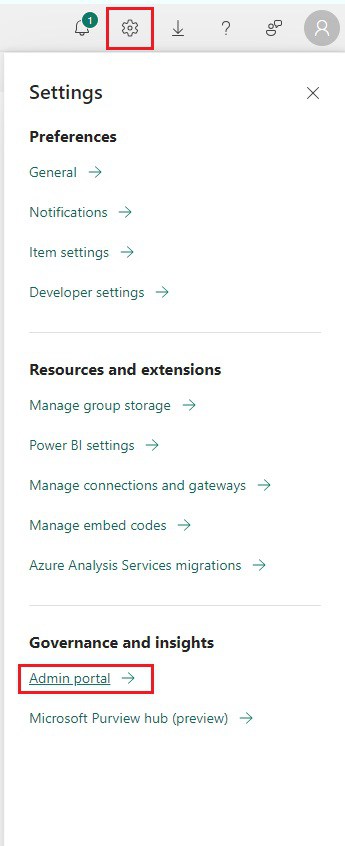
- Next, click on the Tenant setting tab -> Under ‘Export and sharing setting’, expand the ‘Publish to Web’ feature.
- Then enable the Publish to web feature, and enable the ‘Allow users to create new embed codes‘ feature.
- Then you can select who you want to get this applied to.
- Then click on the Apply button.

Now, you can use the publish to web feature in Power BI Service, without the error of ‘Contact your admin to enable embed code creation’.

This is how to resolve the Power BI error – contact your admin to enable embed code creation.
Conclusion
In this Power BI tutorial, we explored the reason behind the error and how to resolve it – contact your admin to enable embed code creation.
You may also like:
- How to Export Power BI Report to Excel using Power Automate?
- Power BI Treemaps
- Power BI Slicer Filter Another Slicer
- How to Format Table Visual in Power BI?

After working for more than 18 years in Microsoft technologies like SharePoint, Microsoft 365, and Power Platform (Power Apps, Power Automate, and Power BI), I thought will share my SharePoint expertise knowledge with the world. Our audiences are from the United States, Canada, the United Kingdom, Australia, New Zealand, etc. For my expertise knowledge and SharePoint tutorials, Microsoft has been awarded a Microsoft SharePoint MVP (12 times). I have also worked in companies like HP, TCS, KPIT, etc.