
I got a requirement from my client to extract email from a SharePoint person or group field. You can do this using JSON in SharePoint.
In this tutorial, I will explain how to use JSON to retrieve an email address from a person or group field in a SharePoint Online list.
To extract the email address from a people picker column of a SharePoint list, you can use Power Automate or JSON formatting.
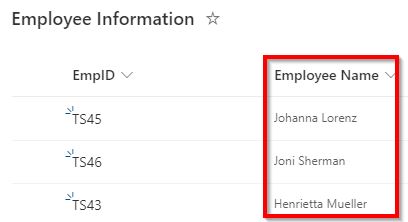
Here, you can see that I have a SharePoint Online list as “Employee Information”; it has a person column as Employee Name.
Based on that column, I will show you how to apply JSON formatting to retrieve email addresses from the person column by creating an additional column.
Get an Email Address from a SharePoint Person Column using JSON
Follow the steps below to get an email address from a person or group column in a SharePoint list using a JSON statement.
- Open a SharePoint list where you need to retrieve email addresses from the person column.
- Now, click on +Add column -> Select Single line of Text -> Click on Next button.

- On the Create a Column page, give a Name for the column and click on Save.

- Now, click on the column header of an Employee Email, Select Column settings, and click on Format this column.

- In the Format column property pane, click on the Advanced mode link.

- In the Format columns, I have applied the following JSON code to retrieve an email address.
- EmployeeName is the internal name of a people picker column.
{
  "$schema": "https://developer.microsoft.com/json-schemas/sp/v2/column-formatting.schema.json",
  "elmType": "div",
  "txtContent": "[$EmployeeName.email]"
}
- Now, you can see that email addresses have been retrieved from the person column in a SharePoint list, as shown below:

This is how to get an email address from a SharePoint list person column using JSON Condition.
I hope you now know how to retrieve an email address from a SharePoint person or group field column using JSON code.
You may also like the following tutorials:
- Create a Custom ID Column in SharePoint List using JSON
- Convert JSON to Custom Object in Power Automate Desktop
- Gantt Chart View in SharePoint Online Modern List Using JSON
- Format a SharePoint Online List Column using JSON

Preeti Sahu is a Microsoft MVP for Power Apps with over six years of experience working with SharePoint Online and the Power Platform. She is the co-author of the book Microsoft Power Platform: A Deep Dive. As a Power Platform developer, she has built various tools with Power Apps and Power Automate, and she makes Microsoft 365 videos for YouTube.