
I was working on a SharePoint project, where we were required to retrieve the current user using the REST API in SharePoint. I wanted to retrieve the current username, display name, email address, ID, and other relevant information.
If you are new to SharePoint REST API, check out the SharePoint REST API Tutorial and Examples.
Get Current User using SharePoint Rest API
In SharePoint, the REST API is quite simple, using the User ID to get the user’s Title, Email, etc.
Use/_api/web/getuserbyid(ID) to get the user field in the response data. We have an “AuthorId” that will get us the user’s Title, Email, etc.

If you are using the classic versions of SharePoint, then you can use a script editor web part to write the complete REST API code.
<script src=”/Style Library/scripts/jquery-1.10.1.min.js”></script>
<script type=”text/javascript”>
var userid= _spPageContextInfo.userId;
var requestUri = _spPageContextInfo.webAbsoluteUrl + “/_api/web/getuserbyid(” + userid + “)”;
var requestHeaders = { “accept” : “application/json;odata=verbose” };
$.ajax({
url : requestUri,
contentType : “application/json;odata=verbose”,
headers : requestHeaders,
success : onSuccess,
error : onError
});

function onSuccess(data, request){
var Logg = data.d;
//get login name
var loginName = Logg.LoginName.split(‘|’)[1];
alert(loginName);
//get display name
alert(Logg.Title);
}
function onError(error) {
alert(“error”);
}
</script>
In the code above, we’ll get the author id from the list. By passing the author id in to GetUserBuId() method, it will return the user in raw format like “I:O#.f|xxxx|[email protected]”. We can get the login name by splitting the output.

Now, I will show you how to get logged-in user profile properties using the REST API in SharePoint.
Here is the complete REST API code that you can add to a SharePoint script editor web part.
<script src="http://ajax.aspnetcdn.com/ajax/jQuery/jquery-1.10.1.min.js"></script>
<script type='text/javascript'>
var workEmail = "";
var EmployeeID = "";
var Division = "";
var userDisplayName = "";
var AccountName = "";
$.ajax({
url: _spPageContextInfo.webAbsoluteUrl + "/_api/SP.UserProfiles.PeopleManager/GetMyProperties",
headers: { Accept: "application/json;odata=verbose" },
success: function (data) {
try {
//Get properties from user profile Json response
userDisplayName = data.d.DisplayName;
AccountName = data.d.AccountName;
var properties = data.d.UserProfileProperties.results;
for (var i = 0; i < properties.length; i++) {
if (property.Key == "WorkEmail") {
workEmail = property.Value;
}
if (property.Key == "EmployeeID") {
EmployeeID = property.Value;
}
if (property.Key == "Division") {
Division = property.Value;
}
}

$('#AccountName').text(AccountName);
$('#userDisplayName').text(userDisplayName);
$('#EmployeeID').text(EmployeeID);
$('#workEmail').text(workEmail);
$('#Division').text(Division);
} catch (err2) {
//alert(JSON.stringify(err2));
}
},

error: function (jQxhr, errorCode, errorThrown) {
alert(errorThrown);
}
});
</script>

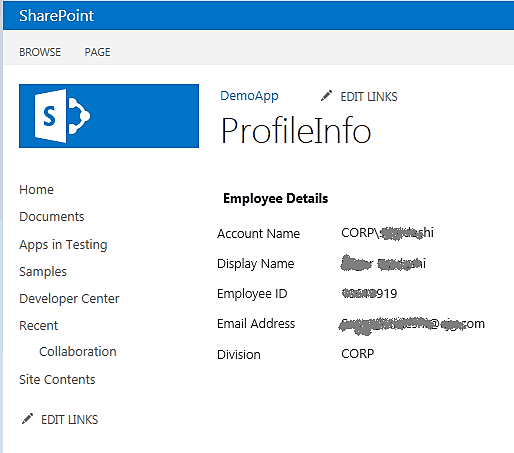
<h2><strong>Employee Details</strong></h2>
<br />
AccountName <span id="AccountName"></span>
DisplayName <span id="userDisplayName"></span>
EmployeeID <span id="EmployeeID"></span>
Email Address <span id="workEmail"></span>
Division <span id="Division"></span>
Finally, the result looks as in the following screenshot:
List of User Properties (Use the GetPropertiesFor function for these):
- AccountName
- DirectReports
- DisplayName
- ExtendedManagers
- ExtendedReports
- IsFollowed
- LatestPost
- Peers
- PersonalUrl
- PictureUrl”
- Title
- UserProfileProperties
- UserUrlList of User Profile Properties :
- AboutMe
- SPS-LastKeywordAdded
- AccountName
- SPS-Locale
- ADGuid
- SPS-Location
- Assistant
- SPS-MasterAccountName
- CellPhone
- SPS-MemberOf
- Department
- SPS-MUILanguages
- EduExternalSyncState
- SPS-MySiteUpgrade
- EduOAuthTokenProviders
- SPS-O15FirstRunExperience
- EduPersonalSiteState
- SPS-ObjectExists
- EduUserRole
- SPS-OWAUrl
- Fax
- SPS-PastProjects
- FirstName
- SPS-Peers
- HomePhone
- SPS-PersonalSiteCapabilities
- LastName
- SPS-PersonalSiteInstantiationState
- Manager
- SPS-PhoneticDisplayName
- Office
- SPS-PhoneticFirstName
- PersonalSpace
- SPS-PhoneticLastName
- PictureURL
- SPS-PrivacyActivity
- PreferredName
- SPS-PrivacyPeople
- PublicSiteRedirect
- SPS-ProxyAddresses
- QuickLinks
- SPS-RegionalSettings-FollowWeb
- SID
- SPS-RegionalSettings-Initialized
- SISUserId
- SPS-ResourceAccountName
- SPS-AdjustHijriDays
- SPS-ResourceSID
- SPS-AltCalendarType
- SPS-Responsibility
- SPS-Birthday
- SPS-SavedAccountName
- SPS-CalendarType
- SPS-SavedSID
- SPS-ClaimID
- SPS-School
- SPS-ClaimProviderID
- SPS-ShowWeeks
- SPS-ClaimProviderType
- SPS-SipAddress
- SPS-ContentLanguages
- SPS-Skills
- SPS-DataSource
- SPS-SourceObjectDN
- SPS-Department
- SPS-StatusNotes
- SPS-DisplayOrder
- SPS-Time24
- SPS-DistinguishedName
- SPS-TimeZone
- SPS-DontSuggestList
- SPS-UserPrincipalName
- SPS-Dotted-line
- SPS-WorkDayEndHour
- SPS-EmailOptin
- SPS-WorkDayStartHour
- SPS-FeedIdentifier
- SPS-WorkDays
- SPS-FirstDayOfWeek
- Title
- SPS-FirstWeekOfYear
- UserName
- SPS-HashTags
- UserProfile_GUID
- SPS-HireDate
- WebSite
- SPS-Interests
- WorkEmail
- SPS-JobTitle
- WorkPhone
- SPS-LastColleagueAdded
This is how to get the current user profile properties using the REST API in SharePoint.
In this tutorial, I explained how to get the current user’s details using the REST API in SharePoint.
You may also like the following tutorials:
- SharePoint REST API Order by, Filter, Pagination, and Select
- SharePoint REST API Create Folder
- The security validation for this page is invalid and might be corrupted in SharePoint Rest API
- SharePoint REST API Create List Item
- How to Get SharePoint List Items using REST API?

After working for more than 18 years in Microsoft technologies like SharePoint, Microsoft 365, and Power Platform (Power Apps, Power Automate, and Power BI), I thought will share my SharePoint expertise knowledge with the world. Our audiences are from the United States, Canada, the United Kingdom, Australia, New Zealand, etc. For my expertise knowledge and SharePoint tutorials, Microsoft has been awarded a Microsoft SharePoint MVP (12 times). I have also worked in companies like HP, TCS, KPIT, etc.

