
This Power Automate tutorial will help you to fix the error “failed to create connection for connection id” that comes while working in Power Automate.
This error comes when you first time try to use a flow template to connect by signing in with different connectors like Twitter, Gmail, Outlook, etc.
Failed to create connection for connection id
Recently, when I was trying to use the Power Automate template, “Get a push notification when you receive an email from your boss”. The error comes as Failed to create connection for connection id ‘/providers/Microsoft.PowerApps/apis/shared_flowpush/connections/shared-flowpush-AED09471-2BD3-4D32-BD54-FCB3EF877EA8’. Failed to fetch.
When I added the Flow and tried to create a Push notification, it gave me the error which looks like the below:

Here, the problem was coming because I did not save the mobile number correctly. So, I have to change the following:
First, go to the Microsoft 365 admin center. Then click on Settings -> Organization profile.
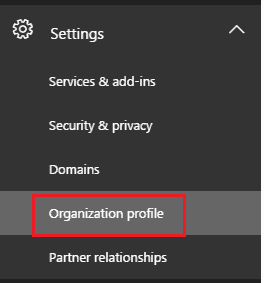
Then, Edit the Organization profile, and I have given the country code in the phone number, like the screenshot below, with the country code. Previously, I provided the number without the country code.

After that, if you see the error, it will not come like below; it is configured successfully.

This is how to fix the “Power Automate failed to create connection for connection id” error.
You may also like:
- How to do Error Handling in Power Automate?
- Power Automate error: The property ‘__metadata’ does not exist on type ‘SP.List’
- Power Automate error: Cannot find the resource for the request addroleassignhments

After working for more than 18 years in Microsoft technologies like SharePoint, Microsoft 365, and Power Platform (Power Apps, Power Automate, and Power BI), I thought will share my SharePoint expertise knowledge with the world. Our audiences are from the United States, Canada, the United Kingdom, Australia, New Zealand, etc. For my expertise knowledge and SharePoint tutorials, Microsoft has been awarded a Microsoft SharePoint MVP (12 times). I have also worked in companies like HP, TCS, KPIT, etc.

