
Skip to content
EnjoySharePoint
EnjoySharePoint
  • Home
  • Start Here
  • Blogs
    • SharePoint Tutorials
    • Power Apps Tutorials
    • Power Automate Tutorials
    • Power BI Tutorials
  • Downloads
  • Live Training

Power Bi Bar Chart

How to Create a Bar Chart in Power BI (Types, Formatting and Conditional Colors)
Updated on October 13, 2026 by Bijay Kumar
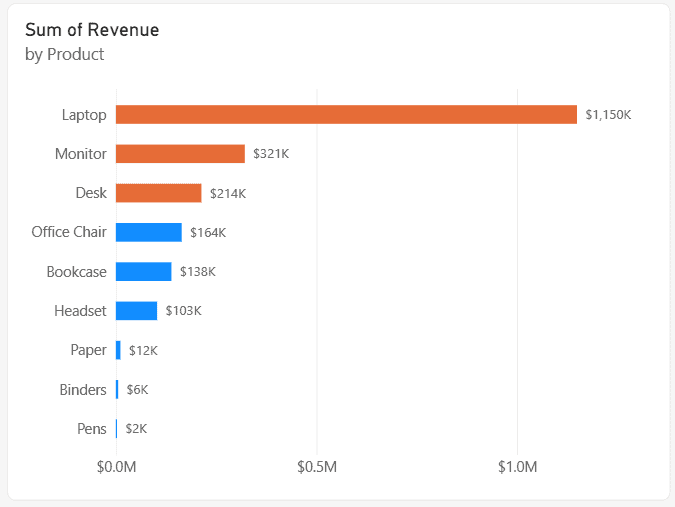
Power BI clustered bar chart of Sum of Revenue by Product with data labels; Laptop $1,150K, Monitor $321K and Desk $214K bars in orange, the rest in blue

When a sales director asks “which products sell the most?”, I answer with a bar chart. Long product names fit on the axis, the ranking is obvious at a glance, and it’s the chart people read correctly without any explanation. In this tutorial, I’ll show you how to create a bar chart in Power BI, … Read more >>>

Free videos Subscribe to Our YouTube Channel Watch SharePoint, Power Apps and Power Automate tutorials step by step with Bijay Kumar, Microsoft MVP. 20K+ subscribers430+ videos Subscribe on YouTube
  • About Us
  • Contact Us
  • Privacy Policy
  • Terms of Use
© 2026 EnjoySharePoint.com

Get the FREE Power Automate Expressions Ebook

122 copy-paste formulas with real examples, sent straight to your inbox.

No spam. Unsubscribe anytime.

Check your inbox

Your free Power Automate Expressions Cheat Sheet is on its way. Can't find it in a few minutes? Look in your Promotions or Spam folder.

Sent to