How to Set Column Width in Power BI Matrix Visual?
Set Fixed Column Width in a Power BI Matrix Visual

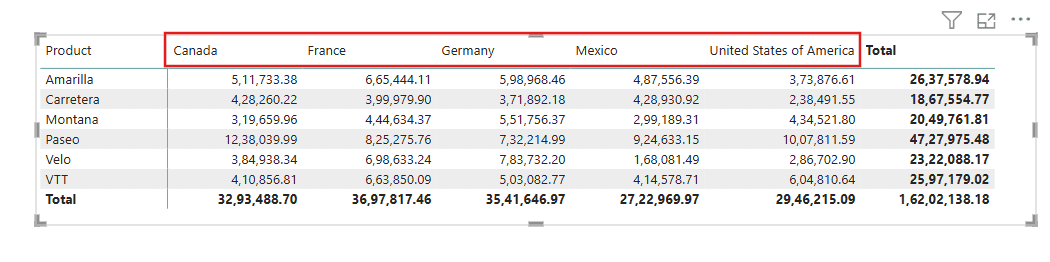
When a Power BI matrix squeezes long product names into a narrow column or stretches a short number across half the visual, you need to control the column width yourself. Power BI sizes matrix columns automatically by default, so the first step is turning that off. Power BI Desktop has an “auto-size column width” feature … Read more >>>

How to Set as Total in Power BI Waterfall Chart?

Power BI set as total in waterfall chart

A waterfall chart usually ends with an automatic total, but often you also need a starting total, such as last year’s revenue on the left, or a subtotal in the middle. In this tutorial, I’ll show you how to set a bar as a total in a Power BI waterfall chart, move or remove the … Read more >>>

Power BI Bar Chart Rounded Corners

Power BI Bar Chart Rounded Corners

Power BI still has no rounded corners setting for the bars themselves. I checked again in Power BI Desktop in October 2026: Format visual > Effects > Visual border > Rounded corners only rounds the visual’s outer border. You can still give a bar chart rounded ends without a custom visual by using error bars, … Read more >>>

How to Show Zero Values in Power BI Bar Chart?

Show Zero Values in Power BI Bar Chart

In a recent sales report, some products had no sales in a region, so their bars simply disappeared from the bar chart instead of showing zero. The data had blank cells, not zeros, and Power BI skips blanks. Here’s how to show zero values in a Power BI bar chart, and how to hide them … Read more >>>

How to Show Zero Values in Power Bi Line Chart?

power bi line chart show zero values

A Power BI line chart with a missing month doesn’t drop to zero; it draws a straight line across the gap, which makes a bad month look normal. In this tutorial, I’ll show you how to make the line chart show zero values when there’s no data, and how to hide zeros when you don’t … Read more >>>

How to Add Filters in Power BI (Visual, Page and Report Level)

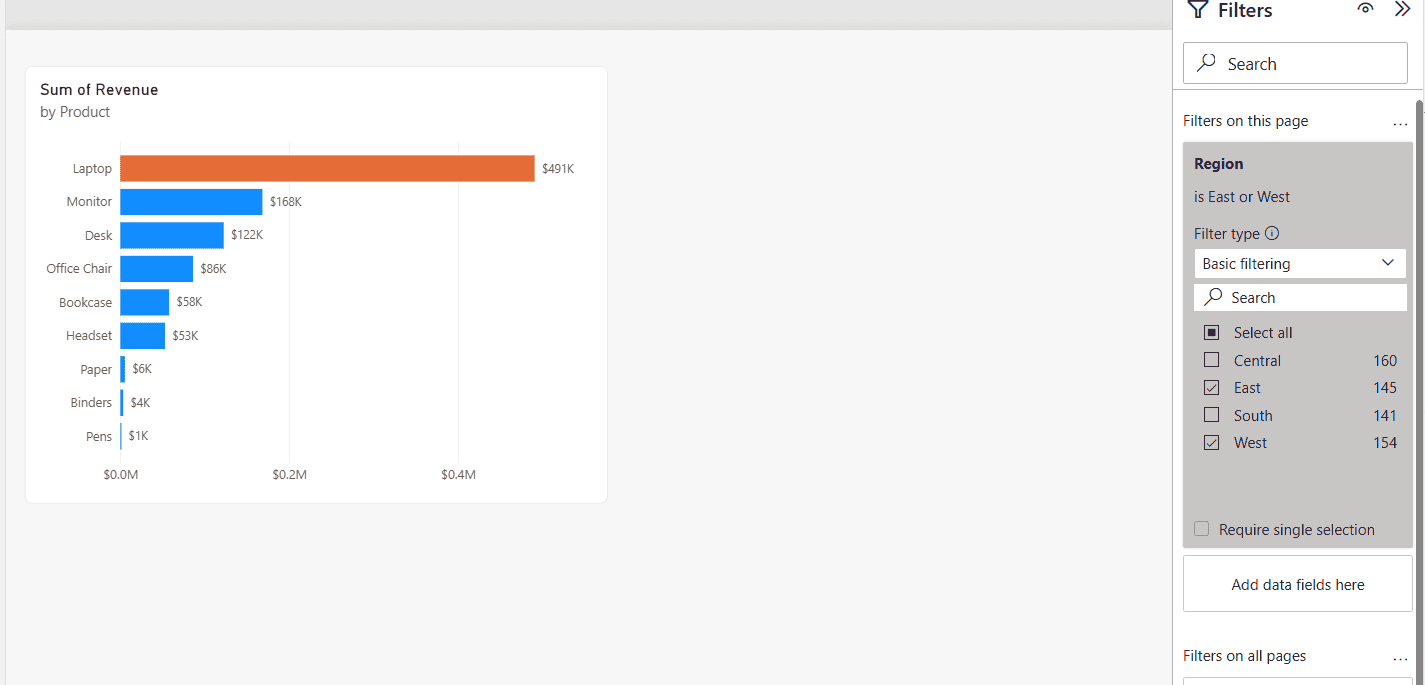
Power BI Filters pane with a page-level Region filter, Basic filtering with East and West selected, and the bar chart showing only East and West revenue

A regional sales report I built had four pages, and every page needed to show only the East and West regions, while one chart on the first page should only list products above $80,000. Both requests are filters, just at different levels, and choosing the right level saves you from repeating the same filter on … Read more >>>

Power BI Matrix Visual Conditional Formatting

Power BI Matrix Visual Conditional Formatting

Have you ever tried applying conditional formatting to your Power BI Matrix visual? That makes your data more engaging and easier to understand. You can add background colors, font colors, data bars, icons, or web links to your matrix visualization to highlight the data. In this tutorial, I will explain how to apply conditional formatting … Read more >>>

2 Various Ways to Change the Visual in Power BI

Change Visual with Bookmark Buttons in Power BI

I recently worked with a client who needed to customize the visuals in their Power BI reports to reflect their business data better. Changing visuals in Power BI is a powerful way to enhance data presentation and make your reports more insightful. In this tutorial, I will show you how to change the visual in … Read more >>>