
The Power Automate isFloat() function checks whether a string can be read as a decimal number and returns true or false. Use it before float(), so a value like “N/A” or “$25.00” doesn’t break your flow with a conversion error.
I ran into this with a Contoso expense form: people typed amounts as “125.50”, “125,50” or “about 125”, and the flow that added them up kept failing. In this tutorial, I’ll show the syntax, what isFloat really returns for tricky inputs (I tested each one in a flow), how the locale parameter works, and a safe pattern to convert the text.
Quick answer: isFloat('<string>', '<locale>') returns true if the string is a valid number, including whole numbers such as “10” and negatives such as “-3.75”. Text with letters or currency symbols returns false, and so does an empty string. The optional locale, such as 'de-DE', tells it which decimal separator to expect.
isFloat() syntax
isFloat('<string>', '<locale>'?)| Parameter | Required | What it does |
|---|---|---|
| string | Yes | The text to check. It must be a string, so wrap numbers or nulls with string() first. |
| locale | No | An RFC 4646 code such as en-US, de-DE or fr-FR. Without it, the invariant culture is used (period for decimals, comma for thousands). |
The function only validates. It doesn’t convert anything, so you still need float() to get a number you can add or compare. That’s covered in converting a string to a float.
What isFloat() returns: tested examples
I built a Compose action with eleven isFloat expressions and ran the flow. Here’s the expression list:
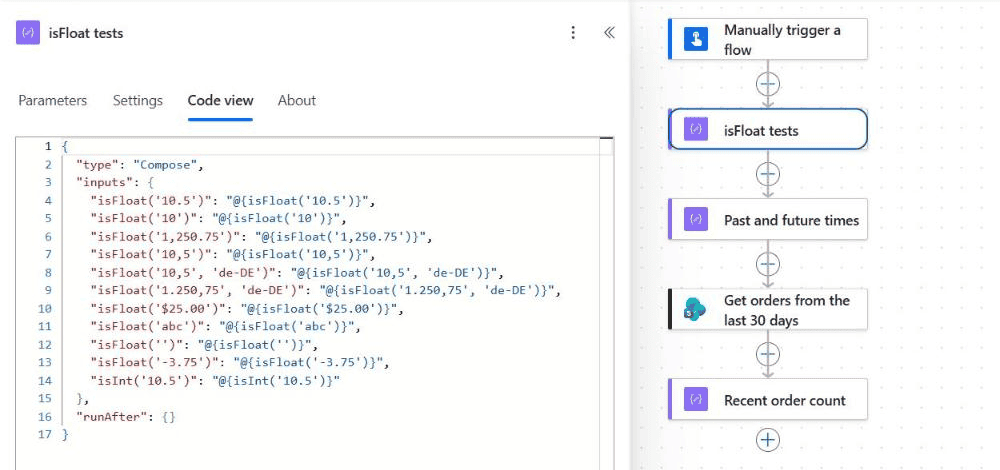
And these are the results from the run:
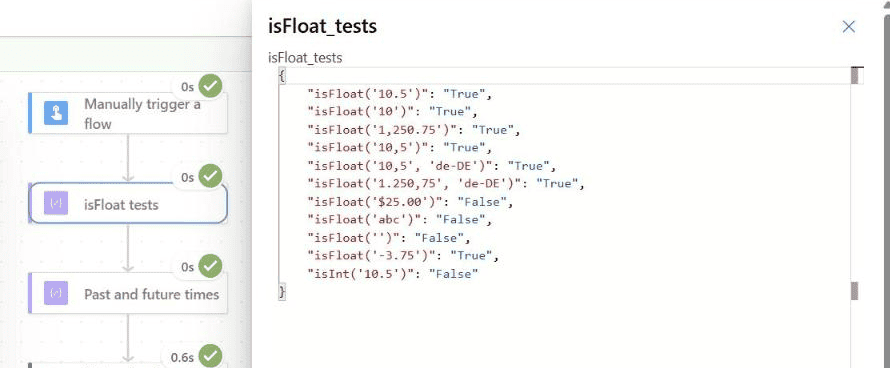
| Expression | Result | Why |
|---|---|---|
| isFloat(‘10.5’) | true | A normal decimal |
| isFloat(’10’) | true | Whole numbers are valid floats too |
| isFloat(‘1,250.75’) | true | Comma is the thousands separator in the invariant culture |
| isFloat(‘10,5’) | true | Read as 105, not 10.5, because the comma is a thousands separator |
| isFloat(‘10,5’, ‘de-DE’) | true | German uses the comma as the decimal separator |
| isFloat(‘1.250,75’, ‘de-DE’) | true | German thousands and decimal separators |
| isFloat(‘-3.75’) | true | Negative numbers are fine |
| isFloat(‘$25.00’) | false | Currency symbols aren’t allowed |
| isFloat(‘abc’) | false | Not a number |
| isFloat(”) | false | An empty string returns false, without an error |
| isInt(‘10.5’) | false | isInt rejects decimals |
Two results surprise most people. First, “10” returns true, so isFloat can’t tell you whether a value has a decimal point. Second, “10,5” returns true without a locale, but it means 105. If your users type commas as decimals, pass their locale.
Check a value and convert it safely
The common pattern is: validate with isFloat, then convert with float(). Here’s how I set it up in the expense flow, where the amount comes in as text from a form or a SharePoint text column:
- Add a Condition action.
- In the left box, select fx and enter
isFloat(triggerBody()?['text']). Set the operator to is equal to and the right box to the expressiontrue. - In the True branch, convert the value with
float(triggerBody()?['text'])and use it, for example in an Update item action. - In the False branch, send the submitter an email that the amount isn’t a valid number.
If you prefer one expression, use if() to fall back to zero. This is handy for initializing a Float variable from user input:
if(isFloat(triggerBody()?['text']), float(triggerBody()?['text']), 0)To round the result or drop the decimals afterward, see how to convert a float to an integer.
Use the locale parameter for European formats
The same text means different numbers in different countries. Pass the locale to both isFloat and float, so the check and the conversion agree:
| Text | Locale | isFloat | float() result |
|---|---|---|---|
| 1,250.75 | none (invariant) | true | 1250.75 |
| 1.250,75 | de-DE | true | 1250.75 |
| 10,5 | de-DE | true | 10.5 |
| 10,5 | none (invariant) | true | 105 |
if(isFloat(variables('Amount'), 'de-DE'), float(variables('Amount'), 'de-DE'), 0)If you work with users in several countries, read the locale from the user’s profile or a list column instead of hard-coding it. A wrong locale doesn’t throw an error, it just returns false or the wrong number.
isFloat vs isInt vs float
| Function | Returns | Use it to |
|---|---|---|
| isFloat(string, locale?) | true/false | Check that text is any valid number |
| isInt(string) | true/false | Check that text is a whole number (no locale parameter) |
| float(value, locale?) | a number | Convert text to a decimal number (errors on invalid text) |
| int(value) | a number | Convert text to a whole number |
To accept only values with decimals, combine the two checks: and(isFloat(x), not(isInt(x))). The isInt side is explained in the isInt function tutorial.
Filter an array to keep only numeric values
isFloat works inside the Filter array action too. To keep only rows where the Amount text is a number, switch the Filter array condition to advanced mode and use:
@isFloat(string(item()?['Amount']))The string() wrapper matters: if a row has an empty Amount, item()?['Amount'] is null, and isFloat expects a string. With string(), null becomes an empty string, which returns false instead of failing the action.
Common errors
- InvalidTemplate … expected a string: you passed a Number column, an integer variable or null. Wrap it:
isFloat(string(coalesce(x, ''))). - isFloat says true but the math is off by a factor of 10 or 100: the decimal separator is a comma. Add the locale, such as ‘de-DE’, to isFloat and float.
- Currency values fail: remove the symbol first, for example
replace(x, '$', ''). - Values with spaces fail: trim the text with
trim()before checking it.
If you’re new to writing expressions, testing them in a Compose action first, as I did here, saves a lot of failed runs.
More Power Automate expression tutorials:
Frequently Asked Questions
Does isFloat return true for whole numbers like 10?
Yes. Whole numbers are valid floats, so isFloat(’10’) returns true. Use isInt if you need to know whether a value has decimals.
How do I check a number that uses a comma as the decimal separator?
Pass the locale as the second parameter, for example isFloat(‘12,5’, ‘de-DE’). The Microsoft expression reference lists the locale parameter for isFloat and float.
What does isFloat return for an empty string or null?
An empty string returns false. Null causes a template error, so wrap the value with string() or coalesce() first.
What is the difference between isFloat and float in Power Automate?
isFloat only checks the text and returns true or false. float converts the text to a number and fails if the text isn’t valid.
Can I use isFloat on a SharePoint Number column?
A Number column is already numeric, so you don’t need it. If you still want to check it, convert it first with string().

Preeti Sahu is a Microsoft MVP for Power Apps with over six years of experience working with SharePoint Online and the Power Platform. She is the co-author of the book Microsoft Power Platform: A Deep Dive. As a Power Platform developer, she has built various tools with Power Apps and Power Automate, and she makes Microsoft 365 videos for YouTube.