
When working with SharePoint Online using PowerShell, you may encounter the error message: “Connect-SPOService: Current site is not a tenant administration site.” This error occurs when you attempt to connect to SharePoint Online using an incorrect URL format.
connect-sposervice : current site is not a tenant administration site
Let me tell you the reason why this error usually comes.
This error typically occurs when you connect to a regular SharePoint site instead of the SharePoint Online admin center. The Connect-SPOService cmdlet is specifically designed to connect to tenant administration sites, not regular team sites or other SharePoint sites.
Here are a few reasons for this error:
- Using a regular SharePoint site URL instead of the admin URL
- Incorrect URL format when connecting to SharePoint Online
- Attempting to connect without sufficient administrative privileges
I recently connected to a SharePoint Online site using SharePoint management shell where I got the error: connect-sposervice : current site is not a tenant administration site.
I was using the below PowerShell script.
Connect-SPOService -Url https://onlysharepoint2013.sharepoint.com/ -credential [email protected]Then I got the below error.
Connect-SPOService : Current site is not a tenant administration site.
At line:1 char:1
+ Connect-SPOService -Url
https://onlysharepoint2013.sharepoint.com/sites/SPTraini …
+ ~~~~~~~~~~~~~~~~~~~~~~~~~~~~~~~~~~
+ CategoryInfo : NotSpecified: (:) [Connect-SPOService], ServerException
+ FullyQualifiedErrorId : Microsoft.SharePoint.Client.ServerException,Microsoft.Online.SharePoint.PowerShell.ConnectSPOService
You can see the screenshot below for the exact error message.
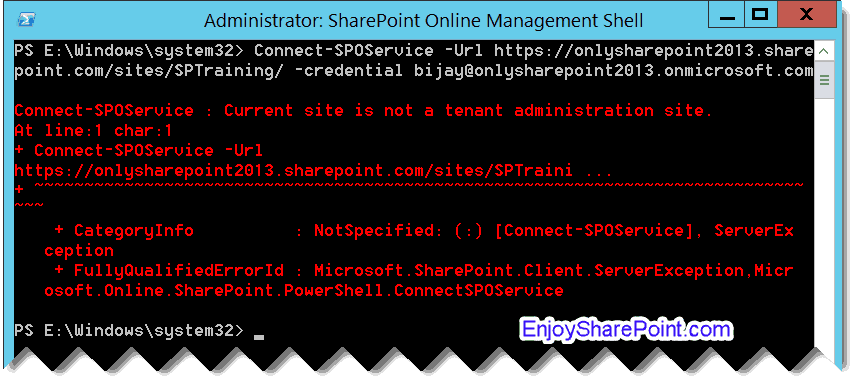
As you can see clearly, I was not providing the tenant administration site but a SharePoint Online team site.
So, to fix the error, you need to modify your URL to point to the tenant administration site.
Here’s the correct format:
Connect-SPOService -Url "https://yourtenant-admin.sharepoint.com"Instead of:
Connect-SPOService -Url "https://yourtenant.sharepoint.com"Here is the modified script:
Connect-SPOService -Url https://onlysharepoint2013-admin.sharepoint.com/ -credential [email protected]Now, when you run the script, you will not see the error.
Here are some common mistakes you can avoid:
- Attempting to use Connect-SPOService with a team site URL
- Forgetting to include the “-admin” in your SharePoint URL
- Using an account without sufficient administrative privileges
- Using the wrong URL format (like “.com” instead of “.com/” or other small typos)
I hope you got it now. How to fix the error: connect-sposervice : current site is not a tenant administration site. Do let me know in the comments below if this helps.
You may also like:
- Add SharePoint Online List Items Using PowerShell
- Get All SharePoint Site Collections Using PowerShell
- Get Site Template in SharePoint Using PowerShell
- Get SharePoint Site Members Using PowerShell
- Delete a SharePoint Online Site Using PowerShell

After working for more than 18 years in Microsoft technologies like SharePoint, Microsoft 365, and Power Platform (Power Apps, Power Automate, and Power BI), I thought will share my SharePoint expertise knowledge with the world. Our audiences are from the United States, Canada, the United Kingdom, Australia, New Zealand, etc. For my expertise knowledge and SharePoint tutorials, Microsoft has been awarded a Microsoft SharePoint MVP (12 times). I have also worked in companies like HP, TCS, KPIT, etc.


Nice one 💪
Thanks
If its a PnP use
Connect-PnPOnline -Url https://tenant.sharepoint.com -Credential [email protected]
Thanks
Thanks -will try your suggestion.
Thank you! Saved some time for me!
Thank you. It helped me to solve the problem with connecting to SharePoint Online admin centre.
Using Connect-SPOService with a credential prevented me to see that my password was expired. Using it directly enabled me to see that was the problem, change my password and then successfully connect
Many thanks! Worked like a charm.
Perfect!!!
Hi,
i am trying to create some folders in a perticular sharepoint subsite..i am getting the error while connecting. but i am able to connect to main site…
could you please help and give me the script to make the changes on subsites post connected to main site?