
A support team at Contoso asked me for a simple rule: if a customer’s remarks mention a refund, send the request to Billing, otherwise send it to Support. That’s a classic Power Automate condition that checks whether a string contains a value, and it’s easy to get slightly wrong.
The catch is case. A customer types “Refund”, “REFUND” or “refund”, and a plain check only matches one of them. In this tutorial, I’ll build the flow in the new designer, show you the result of every check from a real run, and explain how to test for several words or for text that’s missing.
Quick answer: Add a Condition, put your text (or toLower() of it) in the left box, pick the contains operator, and type the word in lowercase on the right. In an expression, use contains(toLower(<text>), 'refund'). The contains() function is case-sensitive, so lowercase the input, not the search word.
Two ways to check if a string contains a value
Power Automate gives you two tools for the same job, and they return the same true or false result:
- The Condition operator. In a Condition card, choose contains or does not contain from the operator list. It’s the easiest option when you only need a Yes/No branch.
- The contains() expression. Write
contains(text, value)anywhere an expression is allowed: in a Compose, in a Filter array, or insideor()andand()when you check several words.
Both work on text, arrays and objects. If you want the full syntax with more examples, see my guide to the Power Automate contains() function.
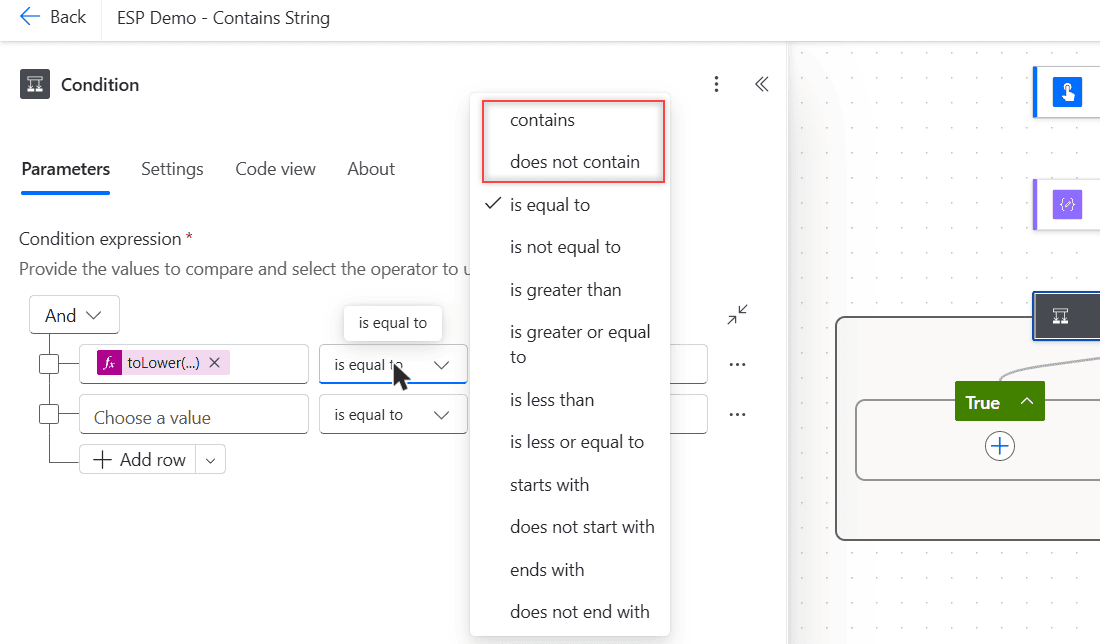
Build the flow: route remarks that mention a refund
Here’s the flow I built for this tutorial. It uses a manual trigger so you can test it in seconds, but the same condition works with a SharePoint, Forms or email trigger.
- Create an Instant cloud flow with Manually trigger a flow, and add a Text input named Remarks.
- Select + under the trigger, search for Condition, and add it. I renamed it to Remarks mention a refund.
- In the left box, open the expression editor and enter
toLower(triggerBody()?['text']). - Set the operator to contains and type
refundin the right box. - In True, add the action for refunds (I used a Compose named Route to Billing). In False, add the other path (Route to Support).
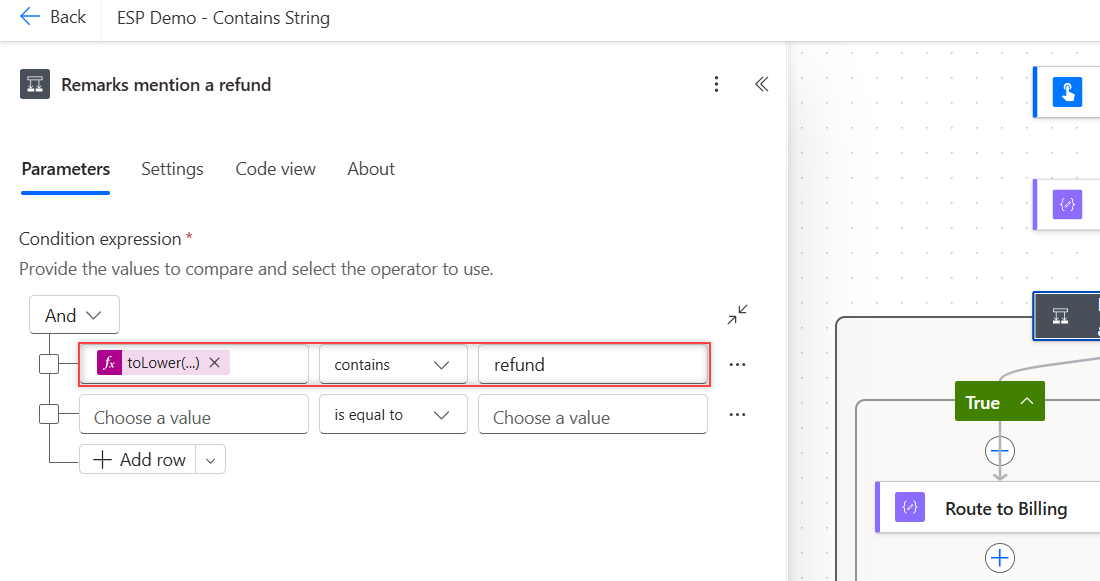
The toLower() call is what makes the check ignore case. I explain the function in detail in how to use the Power Automate toLower function.
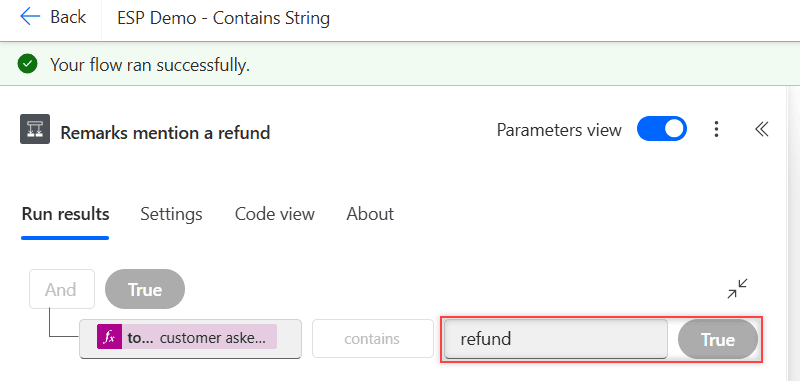
Save the flow, select Test > Manually, and enter Customer asked for a Refund on order ORD-1004. The run results show the evaluated condition: the lowercased text contains refund, so the result is True.
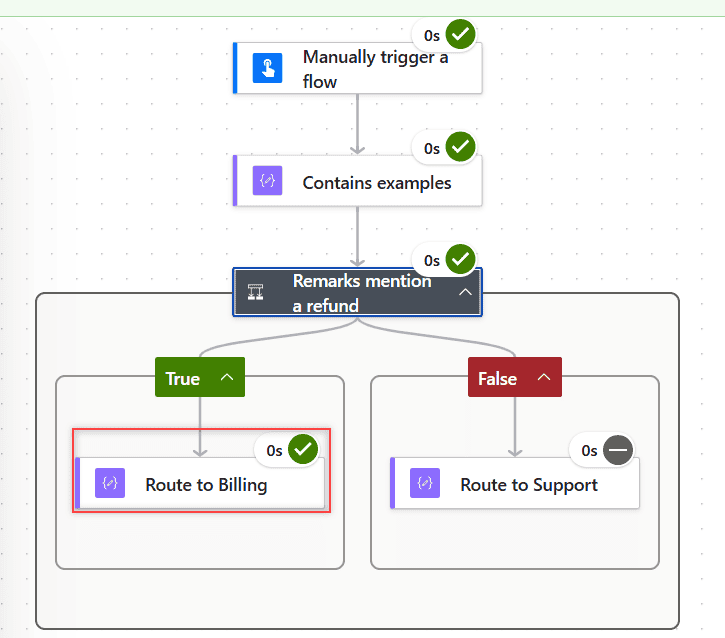
On the canvas, Route to Billing has a green check and Route to Support shows the skipped icon, which is exactly what we wanted.
Is contains() case-sensitive?
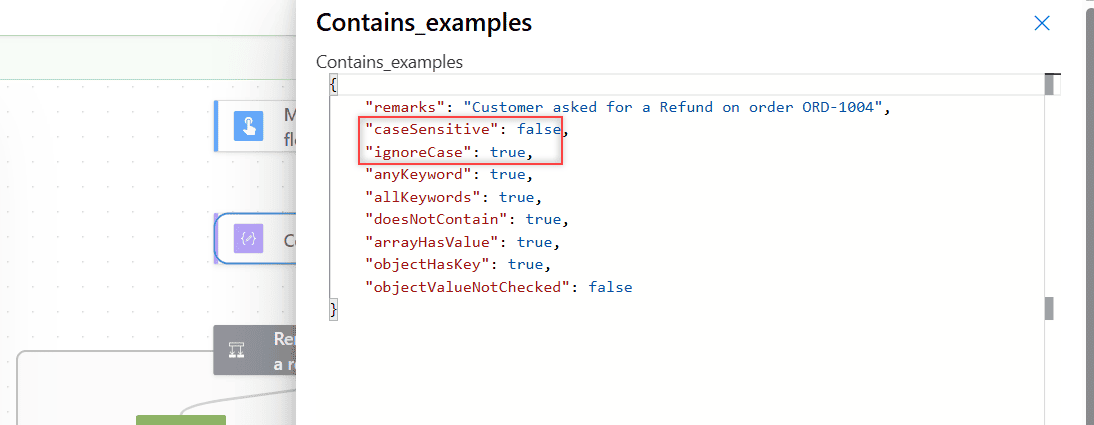
Yes. Microsoft’s function reference says contains() is case-sensitive, and the run proves it. In the same flow, I added a Compose that runs several checks against the same remarks and returns the results as JSON:
{
  "remarks": "@{triggerBody()?['text']}",
  "caseSensitive": @{contains(triggerBody()?['text'], 'refund')},
  "ignoreCase": @{contains(toLower(triggerBody()?['text']), 'refund')},
  "anyKeyword": @{or(contains(toLower(triggerBody()?['text']), 'refund'), contains(toLower(triggerBody()?['text']), 'chargeback'))},
  "allKeywords": @{and(contains(toLower(triggerBody()?['text']), 'refund'), contains(toLower(triggerBody()?['text']), 'ord-'))},
  "doesNotContain": @{not(contains(toLower(triggerBody()?['text']), 'urgent'))},
  "arrayHasValue": @{contains(createArray('Megan Bowen', 'Alex Wilber'), 'Alex Wilber')},
  "objectHasKey": @{contains(json('{"Region":"West"}'), 'Region')},
  "objectValueNotChecked": @{contains(json('{"Region":"West"}'), 'West')}
}
Here are the raw outputs from that run. caseSensitive is false because the remarks say “Refund” with a capital R, while ignoreCase is true because the input was lowercased first.
A common mistake (the old version of this post made it too) is writing contains(text, toLower('PowerApps')). That only lowercases the word you’re searching for, which you already typed. The input still has its original case, so “POWERAPPS” won’t match. Always lowercase the input, then search for a lowercase word.
Not every function behaves this way. Microsoft documents startsWith(), endsWith() and indexOf() as not case-sensitive, while contains() and replace() are. When in doubt, lowercase both sides. You can also use the indexOf function to find text when you need the position.
Check for multiple values with or() and and()
The original version of this tutorial routed inquiries to trainers based on keywords like PowerApps, Power Automate or Power BI. You don’t need a separate Compose for each keyword. Wrap several contains() calls in or() to match any of them:
or(
  contains(toLower(triggerBody()?['text']), 'power apps'),
  contains(toLower(triggerBody()?['text']), 'power automate'),
  contains(toLower(triggerBody()?['text']), 'power bi')
)
Use and() when every word must be present, like allKeywords in the example above, which checks for both “refund” and an order number. Put the expression in the left box of a Condition and compare it with true using is equal to.
If you have more than two or three routes, a Condition inside a Condition gets messy fast. A Switch case in Power Automate or a lookup list that you filter is easier to maintain.
Check that a string does not contain a value
For the opposite test, pick does not contain in the Condition operator list, or wrap the function in not():
not(contains(toLower(triggerBody()?['text']), 'urgent'))To send everything that matches none of your keywords to an “Other” path, reuse the same or() expression inside not(). That one line replaces the long and(if(equals(...))) formula that older examples use.
Contains with arrays and objects
contains() isn’t only for text. With an array, it checks whether one item equals the value. In my run, contains(createArray('Megan Bowen', 'Alex Wilber'), 'Alex Wilber') returned true. The match is on the whole item, so ‘Alex’ alone would return false.
With an object, it checks the keys, not the values. That’s why objectHasKey is true and objectValueNotChecked is false in the outputs. To search inside a list of records, use the Filter array action in Power Automate instead, or read how to check if an array contains a value.
Expression contains() vs the OData contains filter
Don’t confuse the expression function with contains in a filter query. In SharePoint Get items or Dataverse List rows, contains runs on the server before the data reaches your flow, and the rules are different. For example, Dataverse string filters ignore case. I cover the server-side version in the OData filter query with startswith and contains.
Filtering on the server is also faster, because the flow doesn’t download items it’s going to throw away.
Common mistakes and how to fix them
- The condition is always false. Check case first. Lowercase the input with
toLower()and type the search word in lowercase. - The flow fails on some items. The field is empty (null) for those items, and
toLower()needs a string. UsetoLower(coalesce(triggerBody()?['text'], ''))so a blank field becomes an empty string. - It matches too much. Searching for ‘ship’ also matches ‘relationship’. Add spaces around the word or check whether a string is empty in a Condition before you test it.
- An empty search word returns true. Every string contains an empty string, so make sure the value on the right isn’t blank.
- Spaces break the match. “Power Automate” and “PowerAutomate” are different strings. Check both forms with
or(), or remove spaces withreplace(text, ' ', '')first.
Want to go further with text checks? These tutorials pick up where this one ends:
Frequently Asked Questions
How do I check if a string contains a value in Power Automate?
Add a Condition, put the text in the left box, choose the contains operator and enter the value on the right. In an expression, use contains(text, ‘value’), which returns true or false.
Is the Power Automate contains function case-sensitive?
Yes. The Microsoft function reference for contains() states it’s case-sensitive. Use contains(toLower(text), ‘value’) with a lowercase value to ignore case.
How do I check if text contains one of several words?
Combine several contains() calls with or(), for example or(contains(toLower(x), ‘refund’), contains(toLower(x), ‘chargeback’)). Use and() when every word must be present.
How do I check that a string does not contain a value?
Choose the does not contain operator in the Condition, or use not(contains(text, ‘value’)) in an expression.
Can contains() check an array or an object?
Yes. For an array, it checks whether one item equals the value. For an object, it checks whether a key with that name exists, not the values.

I have worked with Microsoft technologies for more than 18 years, including SharePoint, Microsoft 365 and the Power Platform (Power Apps, Power Automate and Power BI), at companies like HP, TCS and KPIT. I started EnjoySharePoint in 2011 to share the solutions I build in real projects with readers in the United States, Canada, the United Kingdom, Australia, New Zealand and beyond. Microsoft has recognized this work with the Microsoft MVP award 13 times since 2014.